

OptionStrat Review
Visualize options strategy payoffs in a browser, with an optimizer and an unusual-flow feed as extra jobs.
Reviewed
Quick verdict
OptionStrat
Start here if you want to see the payoff diagram of a structure in a browser. Pay for live data, the optimizer extras, or the flow feed.
Sourced fit
- Interactive strategy builder with debit/credit, listed max profit/loss, breakevens, and a P/L table or graph.
- More than 50 templates, plus custom structures including covered calls and double diagonals.
- Strikes can be dragged and implied volatility adjusted, with the display updating immediately.
Sourced limits
- Not a broker. Whether it can send orders is unverified.
- Canadian-listed options coverage is unverified.
- Live data is limited to individual/non-professional users (vendor statement).
- Annual (Save 12%!): Live Tools $35.00/mo billed at $419.99/yr; Live Flow $83.33/mo billed at $999.99/yr. Monthly stickers stay $39.99/mo and $99.99/mo.
This directory may earn a commission if you buy through links. That does not change the verdict.
Pricing
Public monthly prices from optionstrat.com/membership: Free, Live Tools $39.99/mo, Live Flow $99.99/mo. Annual (Save 12%!): Live Tools $35.00/mo billed at $419.99/yr; Live Flow $83.33/mo billed at $999.99/yr (2026-09-18). Confirm on the official site before you pay.
Verdict
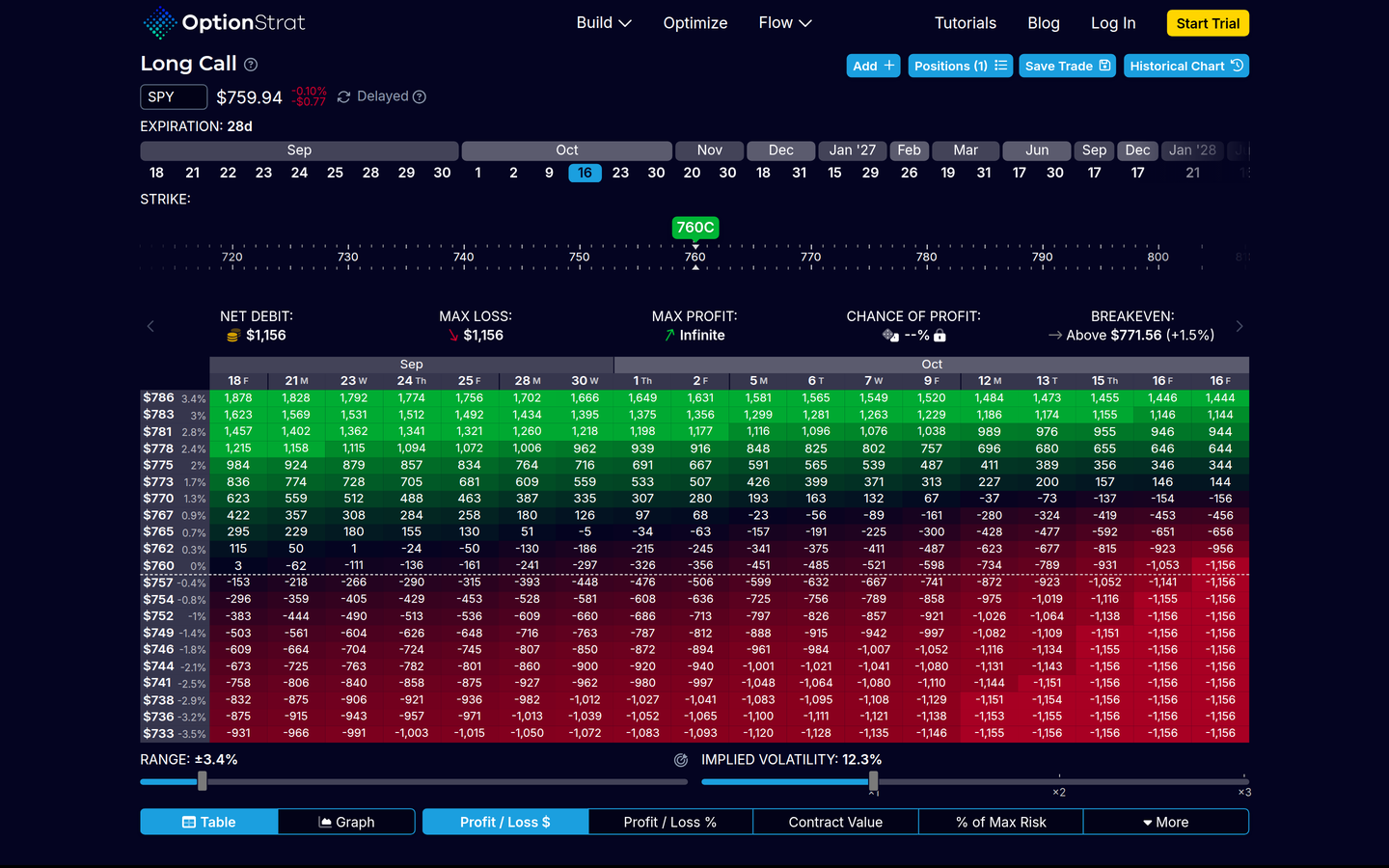
Official strategy builder / payoff diagram UI — Long Call SPY (captured 2026-09-18).
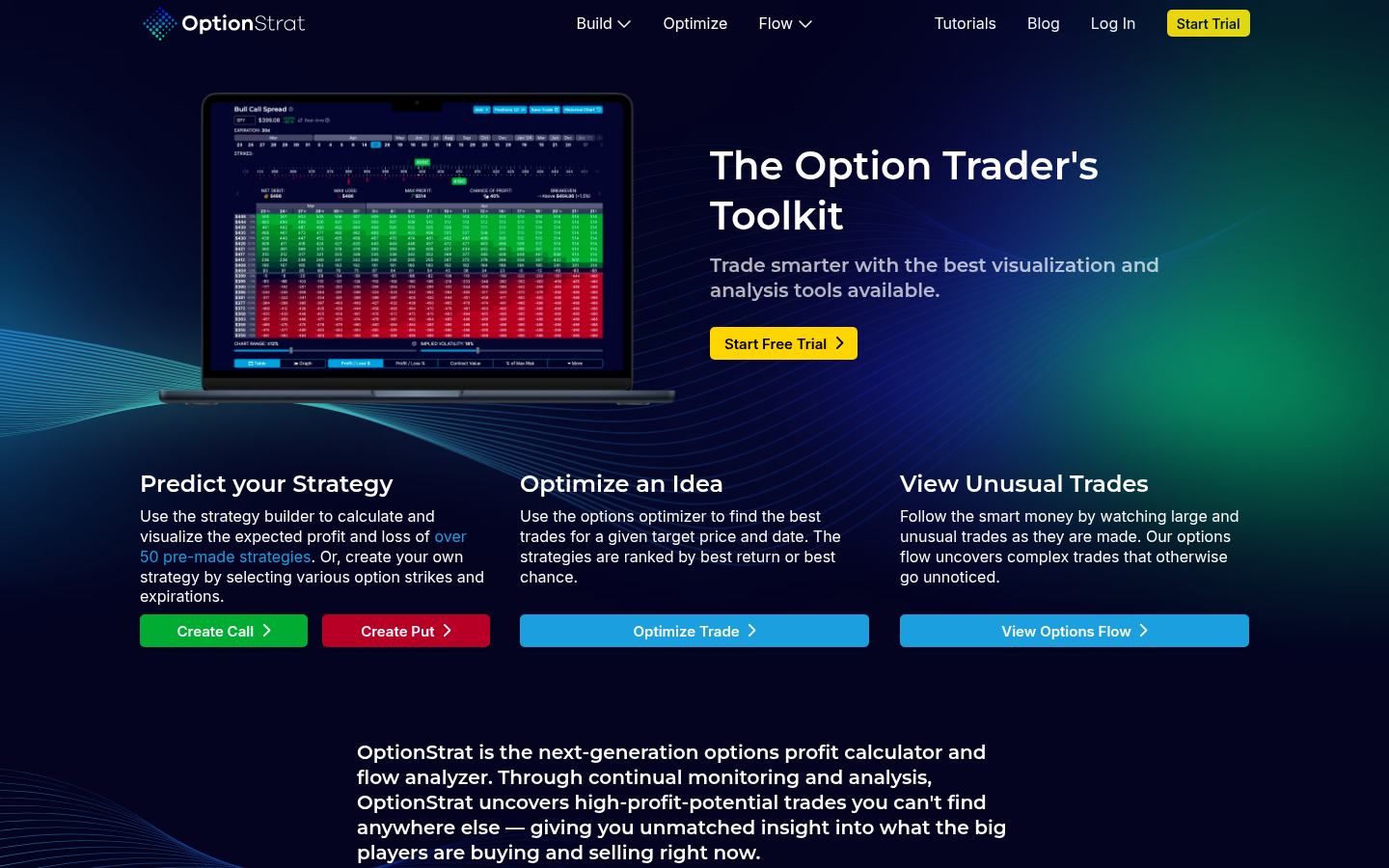
OptionStrat is browser-based options software. On its homepage it calls itself “The Option Trader’s Toolkit.” Public product pages describe three products: a strategy builder / options profit calculator for drawing estimated profit and loss; a strategy optimizer that searches candidate structures for a stated target price and date; and an unusual options flow feed of large or unusual prints.
The public Free plan uses data that “lags by only 15 minutes,” with limited access to each feature. That is enough to open a structure and see a diagram. Paid membership cards were Live Tools at $39.99 a month and Live Flow at $99.99 a month on optionstrat.com/membership. Pay when you want live prices, the membership-tier builder extras, or the live flow feed. Plan table: OptionStrat pricing.
This is a directory listing of analysis software, not a brokerage, not a signal service, and not a source of investment advice. OptionStrat’s own FAQ includes the question “Can I trade through OptionStrat?” Public marketing pages we reviewed describe visualization, optimization, saved-trade tracking, and flow — not account opening or order routing. Whether the product can send orders to a broker is unverified. Do not treat this page as a how-to for placing trades.
OptionStrat also publishes a mobile app. Google Play lists “OptionStrat - Options Toolkit.” The official FAQ includes “Is there an app?” Exact feature parity between web and mobile is unverified.
We are not saying OptionStrat is the best options tool, the best flow tool, or the best purchase. We are not saying it will make a strategy profitable.
Video review
First-party walkthrough on YouTube (same job as this page: OptionStrat is a payoff diagram, not a broker — not financial advice):
OptionStrat Review 2026: Not a Broker, It’s the Payoff Graph (IPS9HMmK6xA)
Best for
- Visualize an options payoff in a browser. Official strategy-builder pages describe assembling a trade by ticker, expiration, and strike, then showing debit paid or credit received, listed maximum potential profit and loss, breakeven prices, and estimated profit and loss in a table or a graph. Strikes can be dragged and implied volatility can be adjusted, with the display updating immediately. Official copy says more than 50 pre-made strategy templates are available, each with a setup chart and a description. Custom structures are supported, including stock-plus-option examples such as covered calls, and multi-expiration examples such as double diagonals. A saved trade can be shared via a unique link. If you only need a quick free calculator, CallPutHub runs multi-leg payoffs in a browser with no signup.
- Starting on Free. Free is delayed 15 minutes, with limited access to each feature. You can open a structure and see a diagram without a paid seat.
- Optimizer and unusual-flow as extra jobs. The optimizer is closer to “search structures for a hypothesis.” Flow is a different job entirely (see scan unusual options flow). Those are extra jobs on the same site, not reasons to call the tool number one. If you would rather test a structure against past data, Option Omega is a no-code options backtester listed under backtest options strategies.
- US-listed OPRA focus. OptionStrat states that it charts trades using data from the Options Price Reporting Authority (OPRA). A November 2020 public launch post described the product as a tool “for creating and visualizing option trades on U.S. stocks.” Current public pages emphasize OPRA options data and US-style futures roots.
That is a fit for traders who want to see the diagram of a structure before they send an order somewhere else. It is not a claim that using the diagram improves results.
Skip if
- You want OptionStrat to be the broker. This is not a broker comparison, and OptionStrat is not listed here as a place to hold cash or clear trades. Whether the product can send orders to a broker is unverified.
- You want stock picks, alerts-as-advice, or a ranked “best trade.” The optimizer ranks candidates by metrics OptionStrat labels as return or chance of profit. Official homepage: “The strategies are ranked by best return or best chance.” Those are software scores, not a forecast, and not our ranking.
- Professional users who need live exchange data under a professional license. OptionStrat’s membership page and pro-users page state that live data is available only to individual and non-professional users. Professional investment advisers and SEC/FINRA-registered persons, it says, cannot receive live data because of licensing cost; other paid features may still be available. Confirm current policy with OptionStrat.
- Your primary job is charting or screening equities. That job belongs on chart and screen stocks and on the TradingView listing. OptionStrat is a payoff diagram and flow product, not a Supercharts replacement.
- You need a verified Canadian-listed options chain. We did not find an official page stating that Canadian-listed options (TSX equities, Montréal Exchange options, CDRs, and similar) are supported. Canadian-listed coverage is unverified. See the Canada note below.
What you get
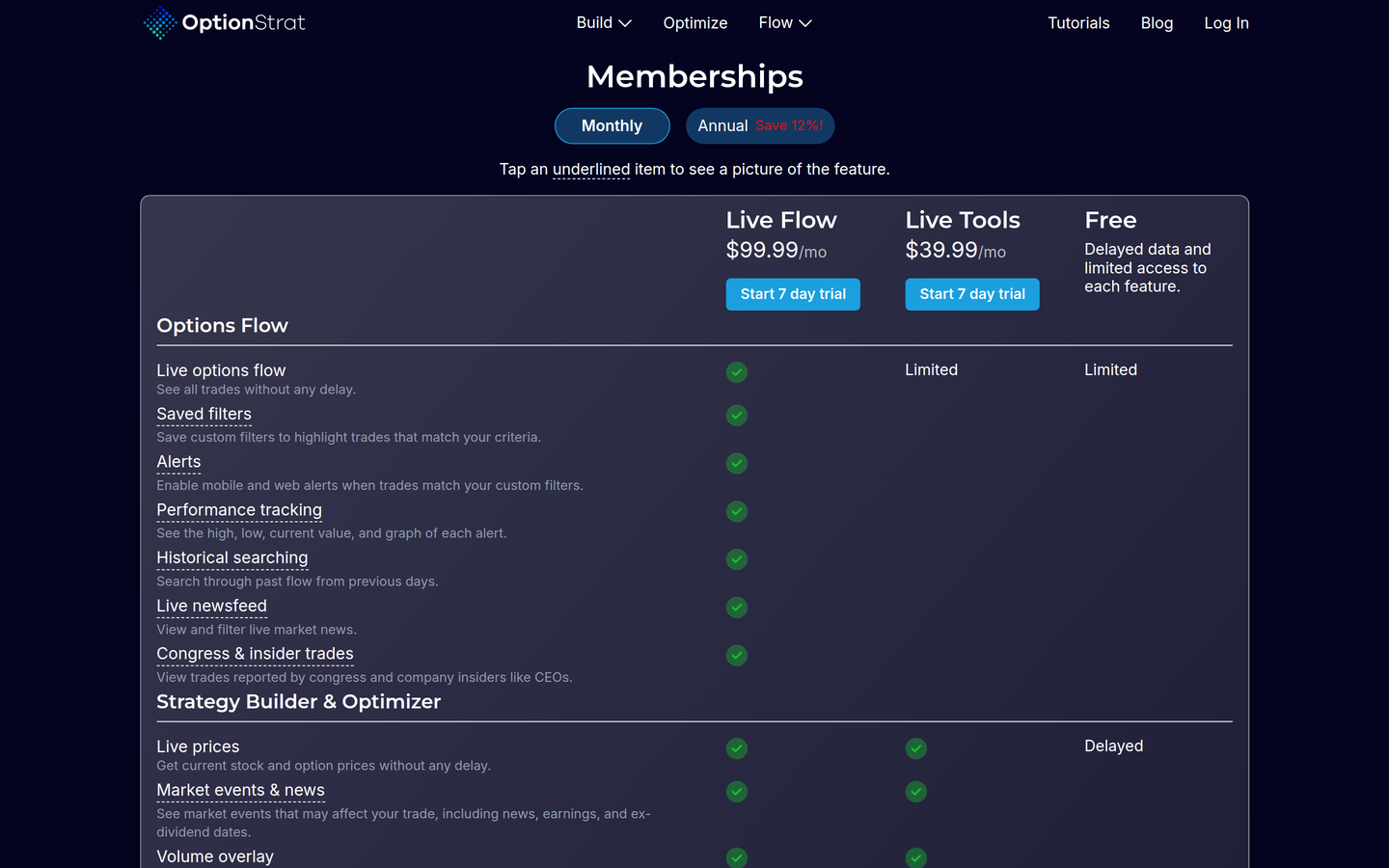
Official membership — Free / Live Tools / Live Flow (captured 2026-09-18).
Public monthly prices on optionstrat.com/membership.
| Free | Live Tools | Live Flow | |
|---|---|---|---|
| Public price as shown | Delayed data; limited access to each feature; no dollar price | $39.99/mo | $99.99/mo |
| Data as shown | “lags by only 15 minutes” | Live auto-refreshing prices | Live options flow, plus Live Tools builder extras on the same page |
| Trial as shown | — | 7-day trial button | 7-day trial button |
| Builder extras listed | Limited access to each feature | Market events and news; volume overlay; chance of profit; net greeks; IV enhancements; saved strategy tracking; commissions; private Discord chat; 15-minute delayed futures | Everything in Live Tools |
| Flow extras listed | Limited access | — | Live options flow; saved filters; alerts; performance tracking; historical searching; live newsfeed; Congress and insider trades |
Membership, trial, and billing extras
Also listed on that page:
- A control labeled Annual with the text “Save 12%!” On Annual (re-verified 2026-09-18): Live Tools shows $35.00/mo billed at $419.99/yr; Live Flow shows $83.33/mo billed at $999.99/yr. Standing
offerson this page keep the Monthly stickers ($39.99/mo / $99.99/mo). - 7-day trial buttons on the paid plans.
- The FAQ includes “Is there a free trial?”, “Can I cancel at any time?”, refund policy, and plan-switching questions. Full answers were not expanded in the public HTML we retrieved; cancellation and refund terms are unverified beyond the existence of those FAQ entries.
- Subscriptions are managed on the platform of purchase (web vs iOS vs Android).
- Vendor-displayed social proof on the membership page: rated 4.6 out of 5 with 3.3k reviews. That is vendor-displayed social proof, not a rating from this directory.
Prices change. Confirm on OptionStrat’s membership page before you pay. This directory does not sell OptionStrat. We may earn a commission if you buy through links on this page.
How it works
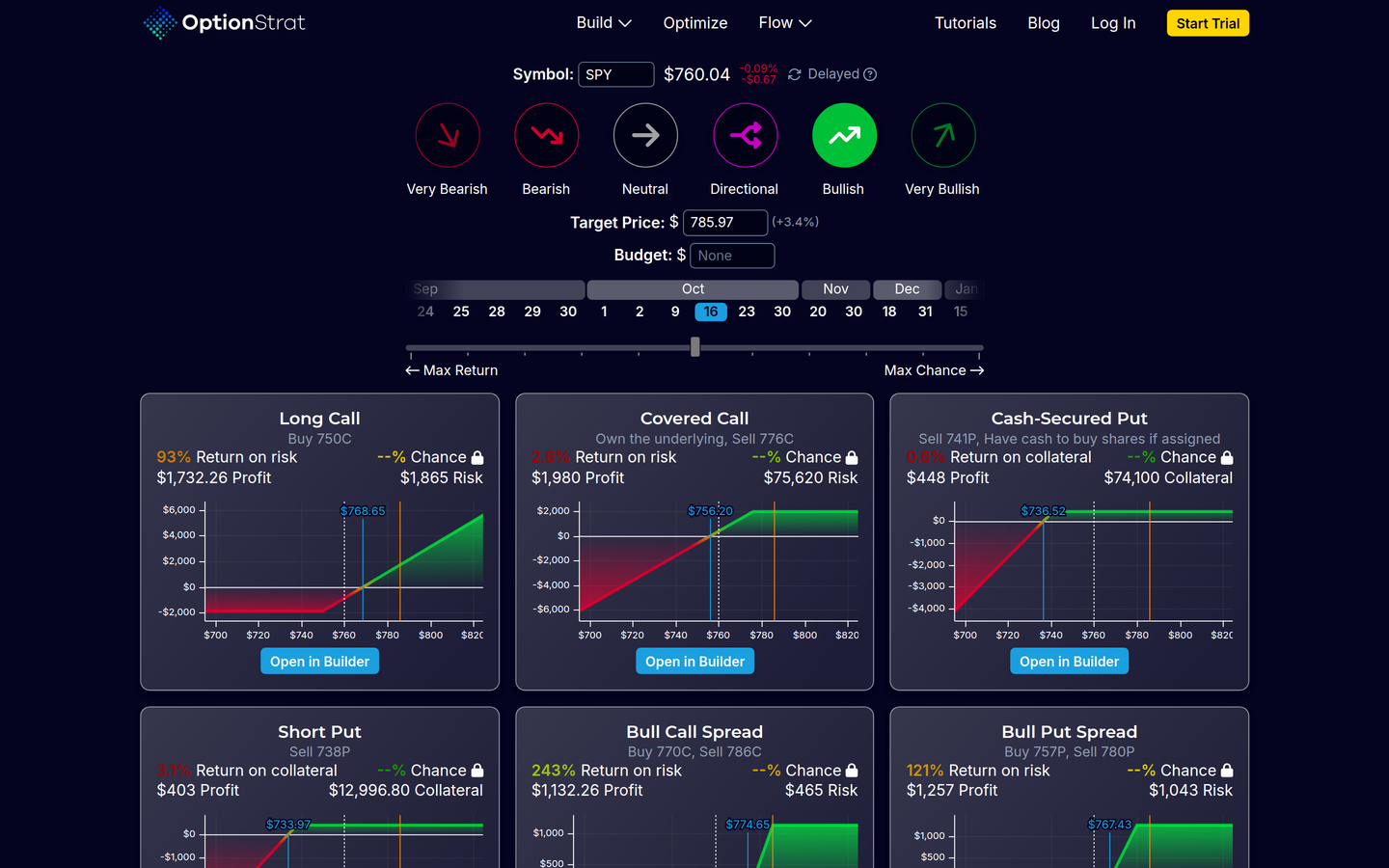
Official strategy optimizer — sentiment, target, return/chance ranking (captured 2026-09-18).
- Open Free or start a 7-day paid trial on optionstrat.com / membership — Free is delayed 15 minutes; Live Tools is $39.99/mo; Live Flow is $99.99/mo.
- Build a structure in the strategy builder. Pick a ticker, expiration, and strike (or a template). The product shows debit/credit, listed max profit and loss, breakevens, and estimated P/L as a table or graph. Drag strikes or change implied volatility; the display updates immediately.
- Optional: run the optimizer. Inputs listed: a sentiment (examples: bearish, bullish) or a target price; a target expiration date; a preference framed as maximizing return, maximizing chance, or a mix. Official homepage: “The strategies are ranked by best return or best chance.” We report that ranking as a product behavior, not as evidence that the top result is a good trade.
- Optional: open unusual options flow. Live Flow lists live flow, saved filters, alerts, historical searching, a live newsfeed, and Congress and insider trades. A flow row can be opened in the options builder.
- Optional: track saved trades. Membership benefits list high/low reached so far, a historical chart, and export. Closing a saved trade is described by OptionStrat as practice without, in their words, “risking real money” — paper tracking inside the app, not a brokerage account.
We tested it
On Oct 13, 2026 we used OptionStrat without logging in. We made no account, entered no card, and started no trial. The page showed “Log In” and “Start Trial” the whole time, so this is the free version as anyone gets it. Quotes on the free plan are labeled “Delayed” and move between page loads, so every figure below is a snapshot from Oct 13 and will be different when you look.
A SPY bull call spread in the builder
We built a bull call spread on SPY for the Oct 16 expiry: buy the 778 call, sell the 788 call. On our first load the builder showed a net debit of about $310, a max profit of about $690, and a breakeven of about $781. The quotes kept moving, and the load in our screenshot showed a debit of $314.50. We checked the math by hand. The spread is 10 points wide, so the most it can pay is $1,000, minus the debit. The expiry column of the profit and loss table matched that formula at every price we checked.
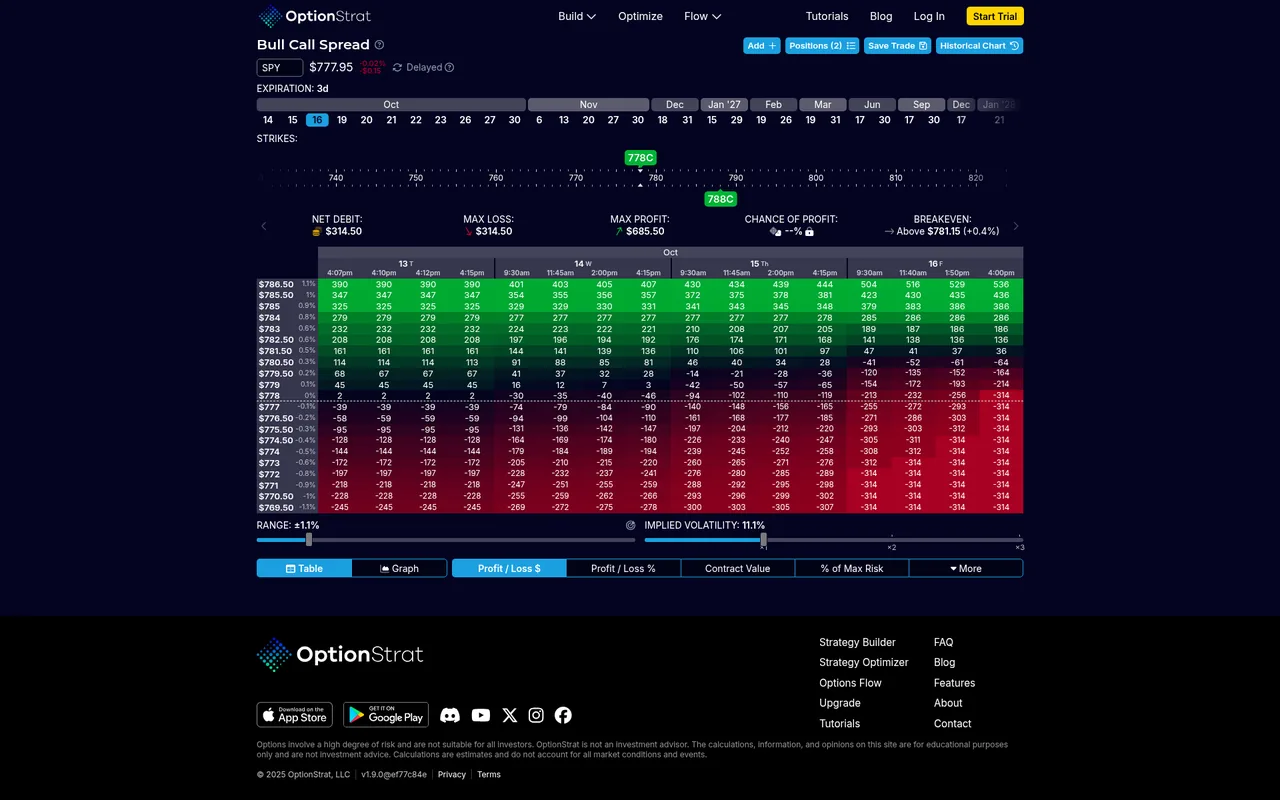
SPY bull call spread, buy the 778 call and sell the 788 call, in table view on Oct 13, 2026. Rows are SPY prices, columns are dates up to expiry. Chance of profit shows a lock.
The graph view shows the same trade as a line, with a marker at the breakeven and a date slider to see earlier days.
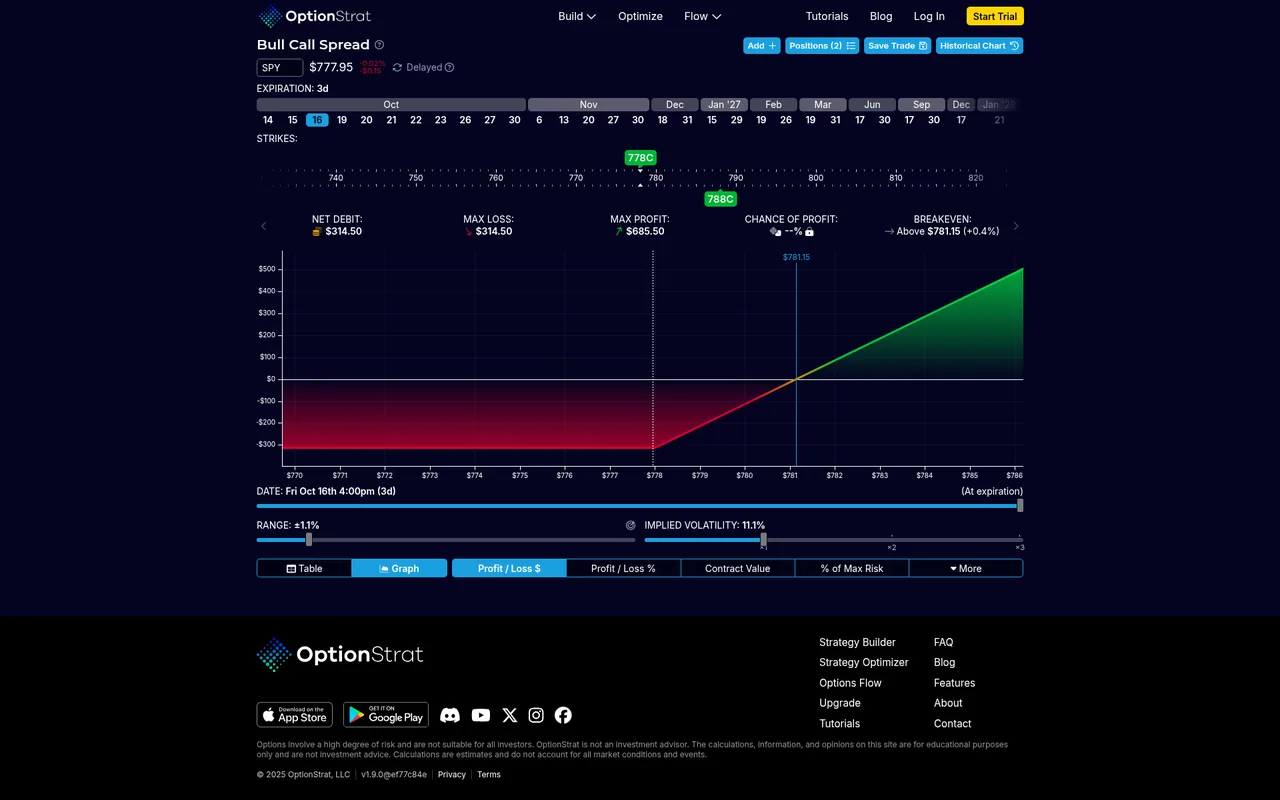
Same trade in graph view, Oct 13, 2026.
One thing to know: typing SPY into the builder did not load the spread we wanted. It picked a Nov 13 expiry and a 5 point wide spread by default, so check the expiry and strikes before you read the numbers.
A QQQ iron condor
Picking Iron Condor from the Build menu loaded it right away, and the ticker box found QQQ as we typed. The builder showed a credit of $426.50, a max loss of $73.50, and breakevens of about $733.74 and $752.27. Those numbers also checked out by hand.
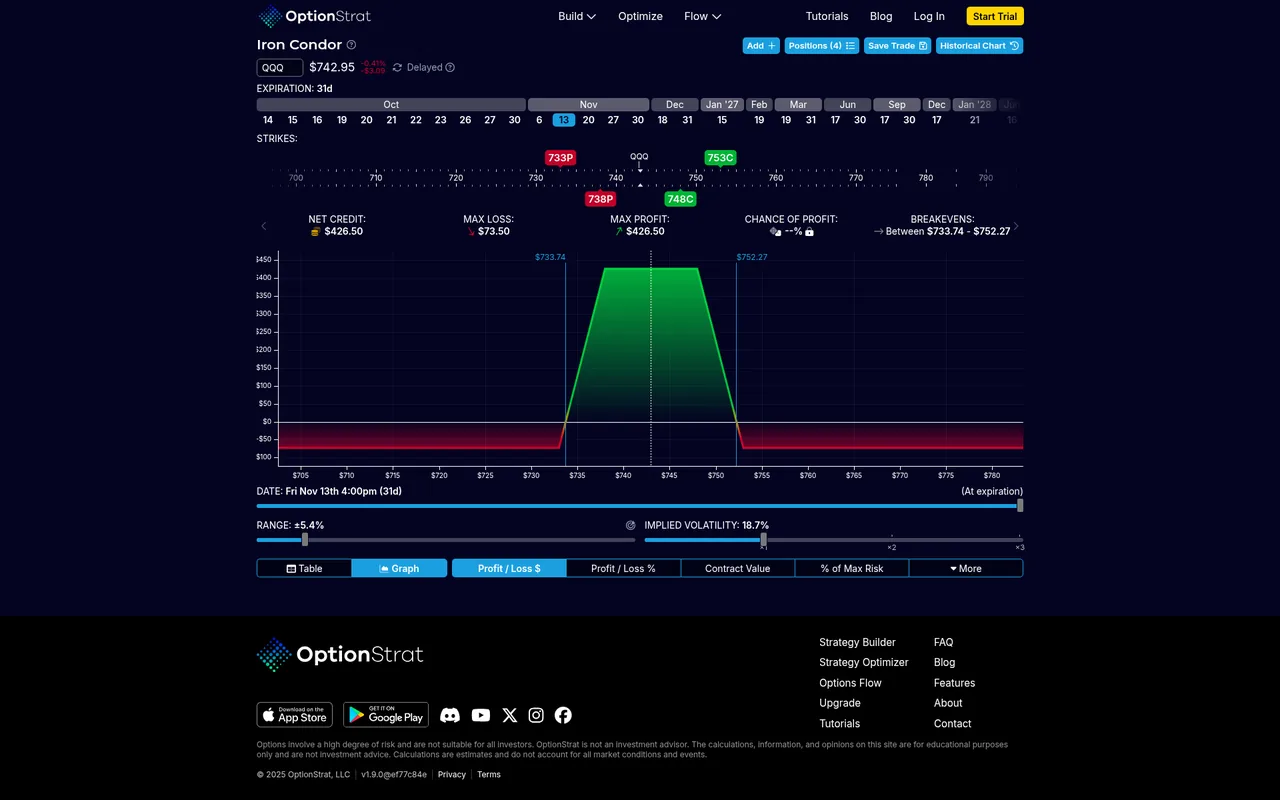
QQQ iron condor in the builder, Oct 13, 2026. Chance of profit is locked here too.
The optimizer
The free optimizer gave six trade ideas for a bullish outlook on SPY, each with a small payoff chart and a button to open it in the builder. The chance figure on every card was locked.
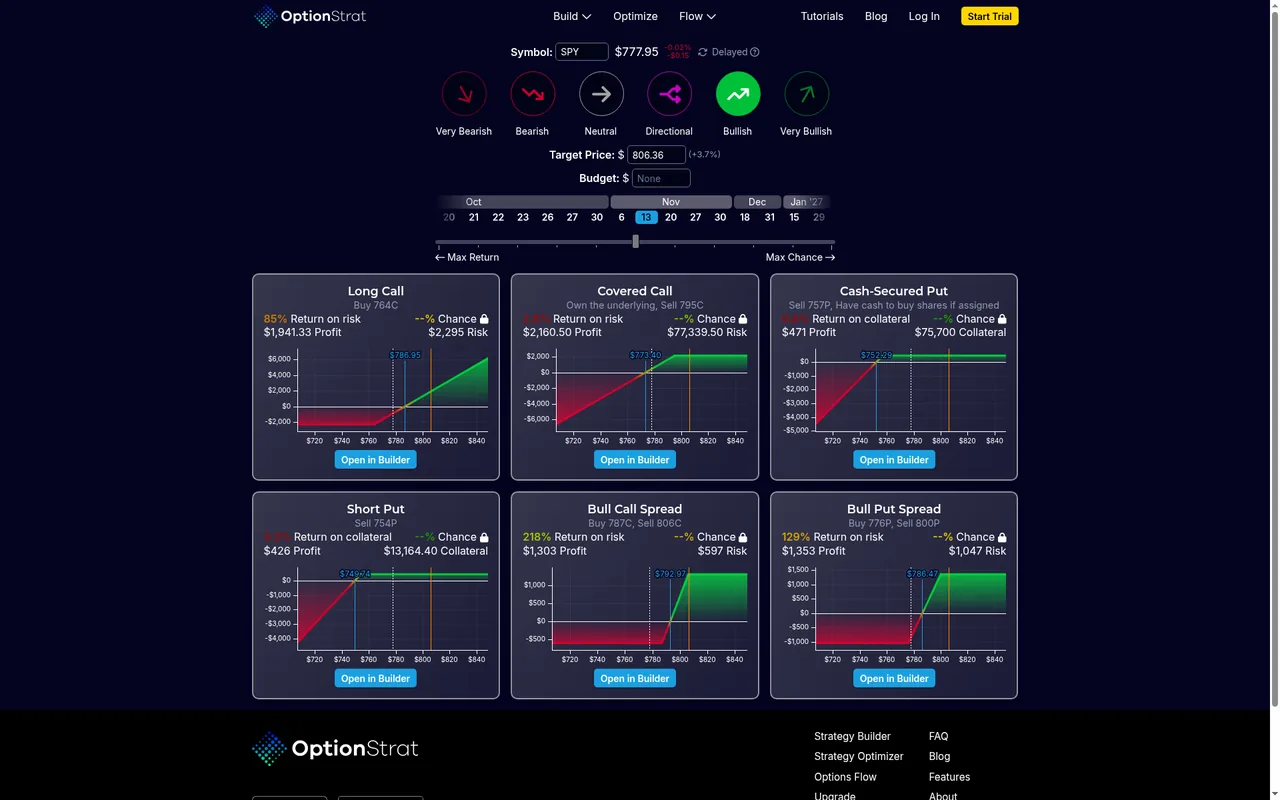
The free optimizer, Oct 13, 2026. Each card shows a lock where the chance should be.
Two things here are easy to misread:
- “Profit” on a card is the profit if the stock lands on your target price. It is not the most the trade can make. The card does not say this.
- The slider toward “Max Chance” surfaces trades far out of the money with tiny profits. One idea risked $5,050 to make $11. On the free plan you cannot see the chance numbers it is sorting by, so you cannot judge the ranking.
Options flow on the free plan
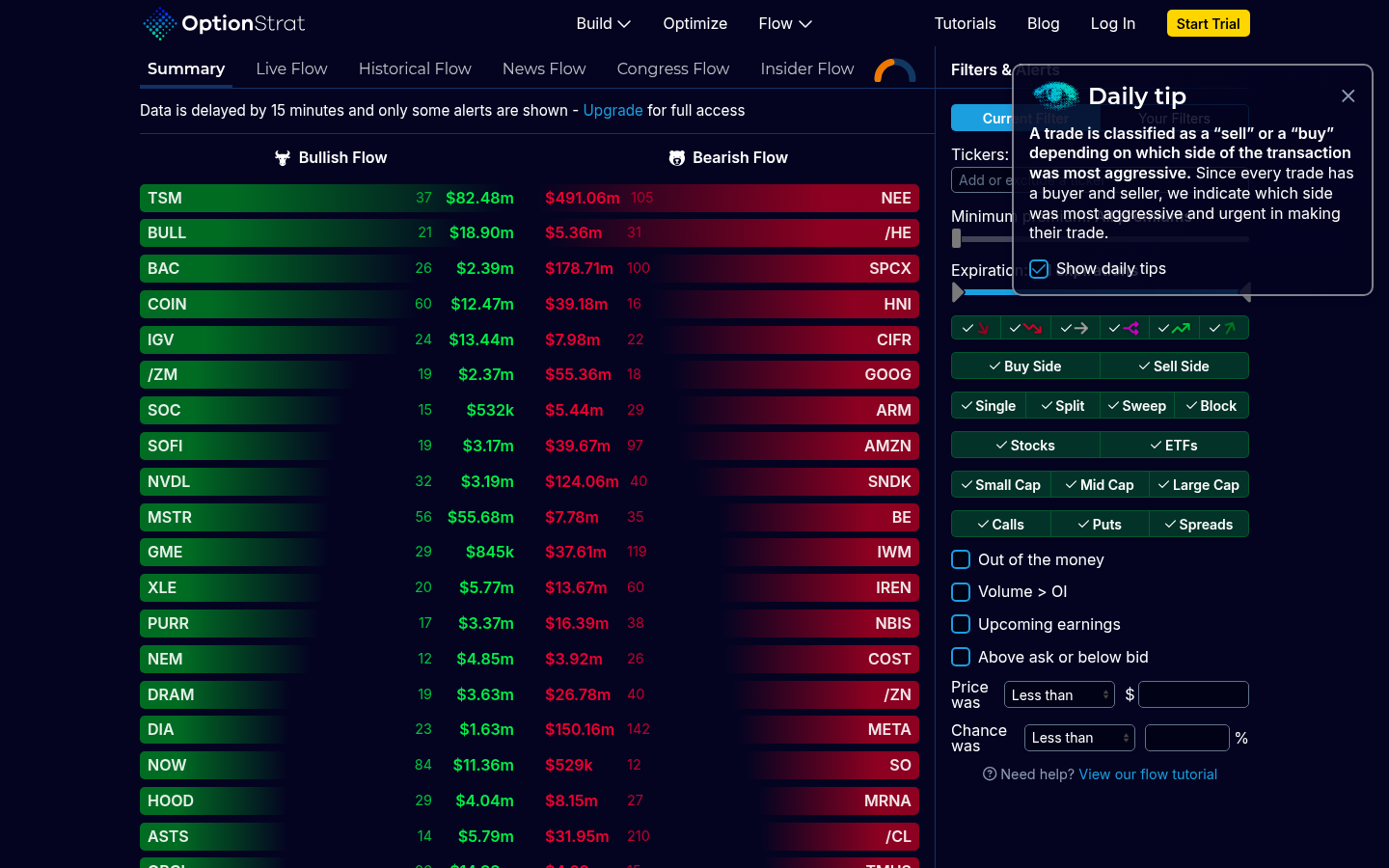
The flow page says the data is delayed by 15 minutes and only some alerts are shown. That matched what we saw. The newest rows were about 15 to 20 minutes old, and some rows were replaced with “Upgrade for Access”. Making your own filters and alerts is locked, and the historical flow search only shows an upgrade notice.
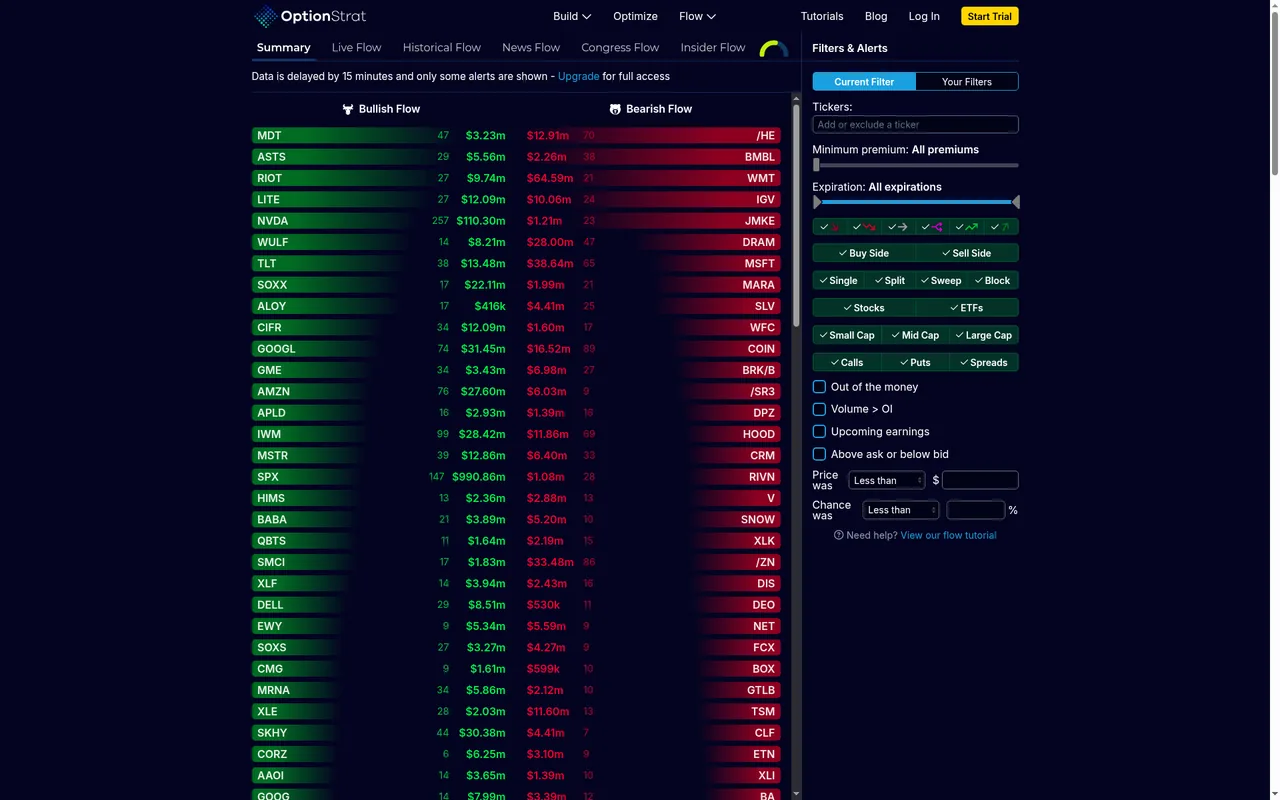
The free flow Summary tab, Oct 13, 2026. The note at the top says data is 15 minutes late.
What works on free
- The strategy builder, with the profit and loss table and graph
- The historical chart of a trade’s value
- Six trade ideas from the optimizer
- Options flow, 15 minutes late and with only some alerts shown
What is locked on free
- Chance of profit
- The greeks
- Commissions in the math
- Your own flow filters and alerts
- Historical flow search
- Saving a trade, which needs a free account (we did not make one)
Prices on Oct 13, 2026
The membership page listed these plans.
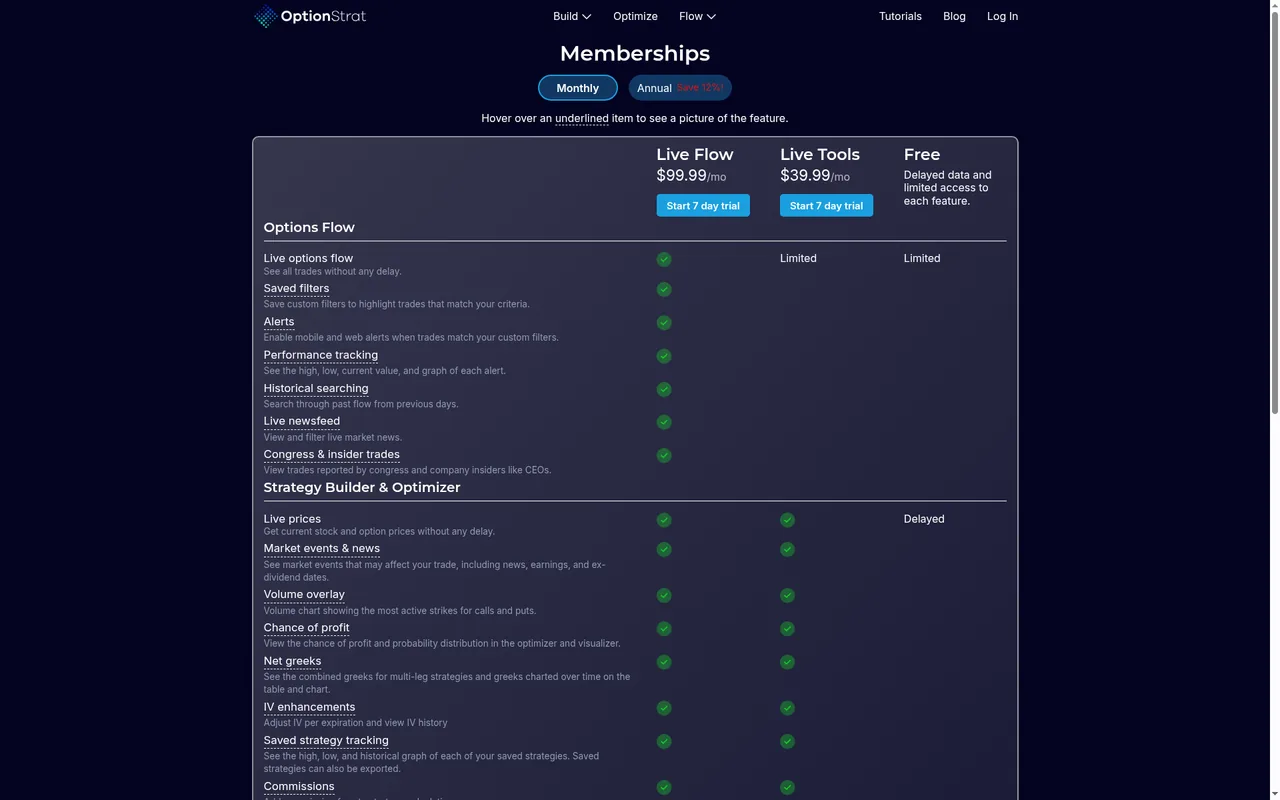
The membership page, monthly view, Oct 13, 2026.
| Plan | Billed monthly | Billed yearly |
|---|---|---|
| Free | $0 | $0 |
| Live Tools | $39.99 a month | $419.99 a year (about $35 a month) |
| Live Flow | $99.99 a month | $999.99 a year (about $83.33 a month) |
Live Tools adds chance of profit, the greeks, and commissions. Live Flow adds the full flow feed, alerts, and historical flow search.
Our take: the free plan is enough to build a trade and see its payoff, and the math held up in our checks. You need Live Tools if you want the chance of profit, which is the number most people look for first. Confirm prices on the membership page before you pay.
Builder vs optimizer vs flow neighbors
OptionStrat centers the interactive payoff diagram. The optimizer and flow feed are extra jobs on the same site. Flow-first neighbors (for example Unusual Whales and Cheddar Flow) center a live tape. Charting neighbors (for example TradingView) center Supercharts. That is a product-shape contrast, not a ranking.
Keeping a record of trades after you place them is a separate job. For that, see journal your options trades and our SwingLEAP review, a planner and journal built for swing and LEAP options.
Watch-outs
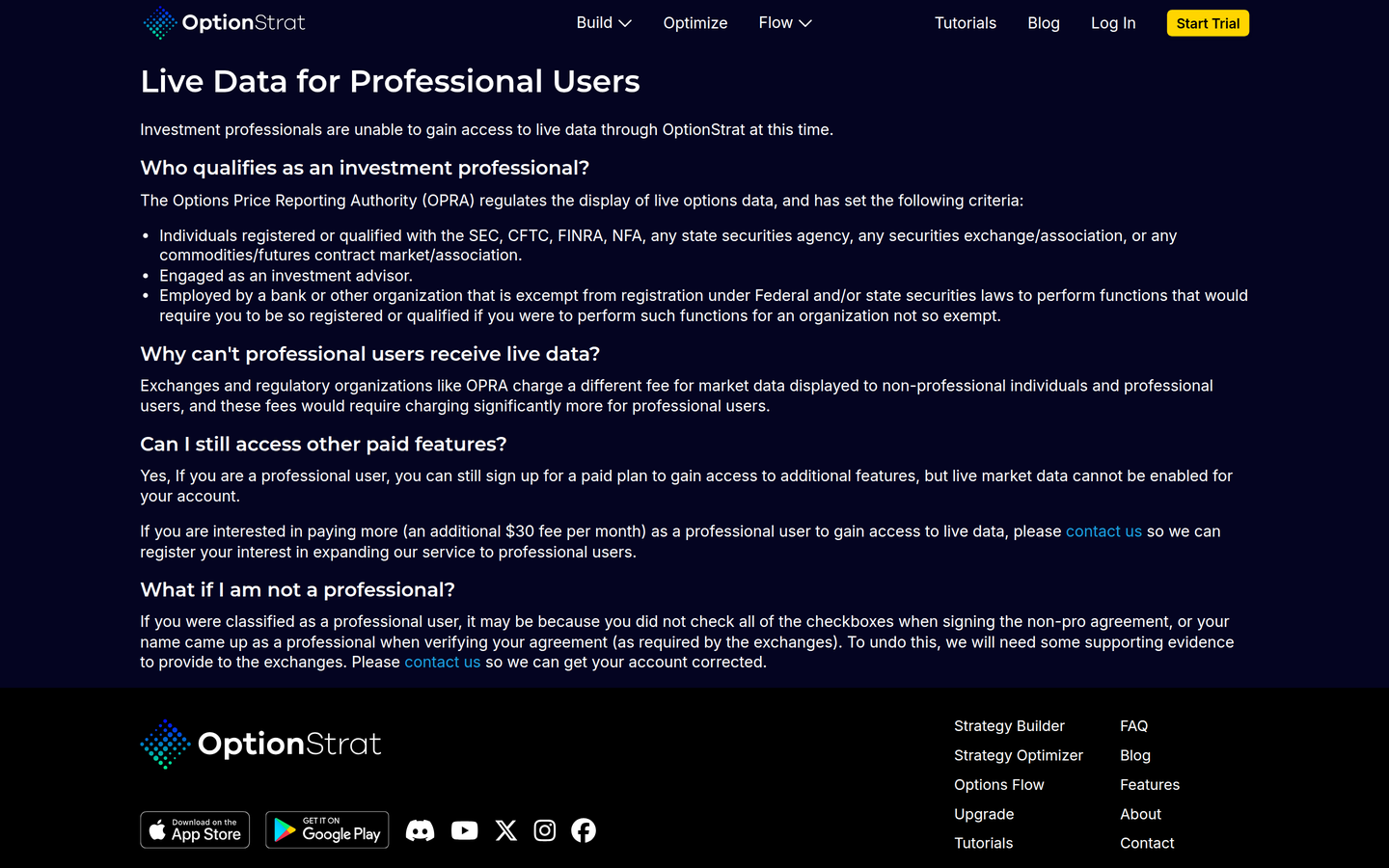
Official pro-users page — live data licensing for professionals (captured 2026-09-18).
- Live data is non-professional only (vendor statement). Membership and pro-users pages: live data is available only to individual and non-professional users. Professional investment advisers and SEC/FINRA-registered persons cannot receive live data because of licensing cost; other paid features may still be available. Confirm current policy with OptionStrat.
- Free data lags 15 minutes, with limited access to each feature.
- Annual is a separate toggle. Monthly stickers stay $39.99/mo / $99.99/mo. Annual (Save 12%!): Live Tools $35.00/mo billed at $419.99/yr; Live Flow $83.33/mo billed at $999.99/yr (2026-09-18).
- Cancellation and refund terms are unverified beyond the existence of FAQ entries on those topics.
- Not a broker. Whether OptionStrat can send orders is unverified. Do not treat optimizer rankings or flow prints as trade recommendations.
- Canada / Canadian-listed coverage is unverified. Public pages emphasize OPRA and US-listed underlyings. See Canada note.
- Futures roots roster is unverified beyond published bullets. Live Tools still lists “Futures — 15-min delayed futures data.” The current roster of futures roots is unverified beyond that plan bullet and a prior blog announcement.
Pros and cons
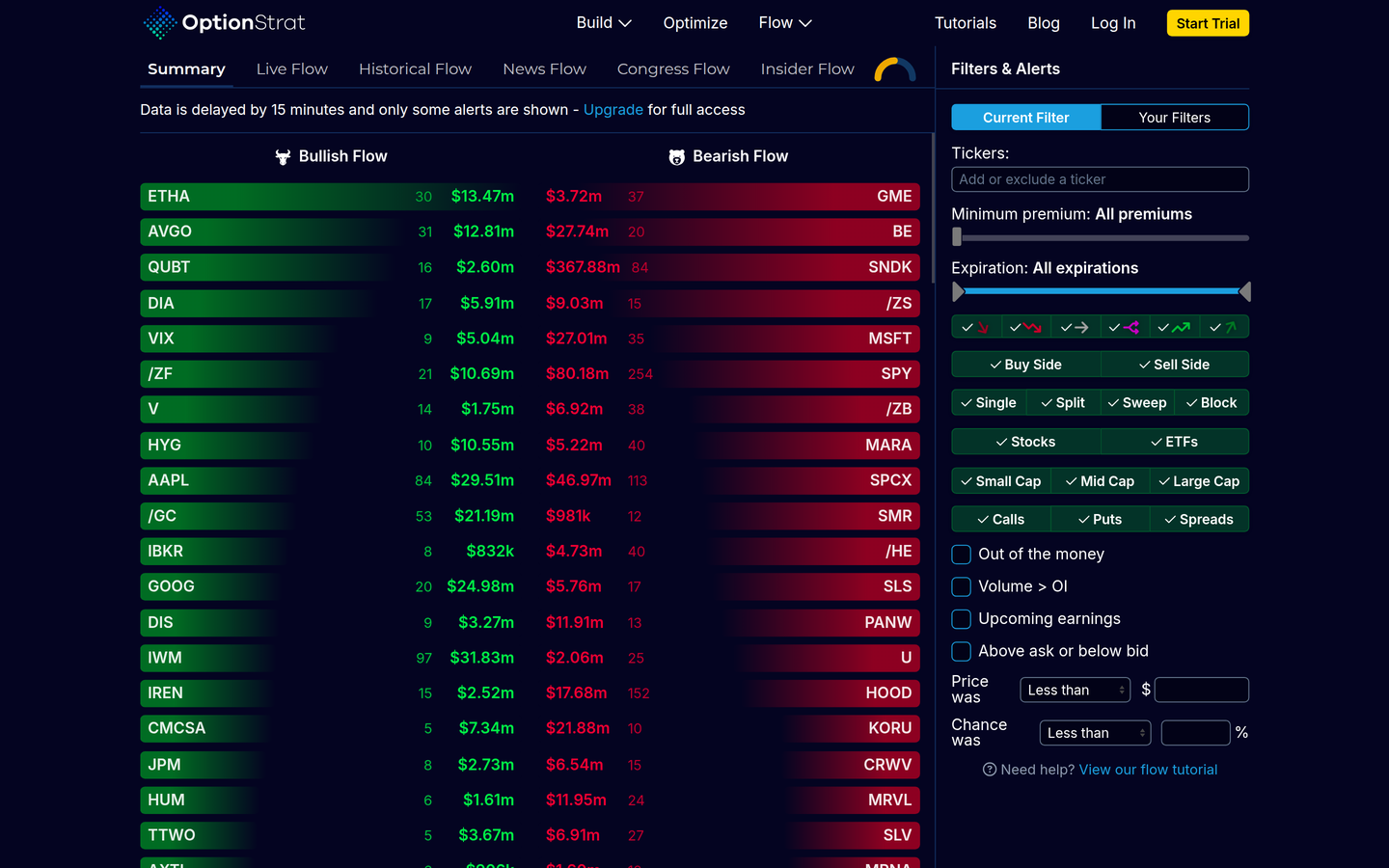
Official Flow Summary / filters product UI (captured 2026-09-18).
Sourced from the official pages listed under Verified features. We do not invent partner-program payout rules.
Pros
- Interactive strategy builder: debit or credit, listed max profit and loss, breakevens, and estimated P/L as a table or graph. Strikes can be dragged and implied volatility adjusted, with the display updating immediately.
- More than 50 pre-made strategy templates, plus custom structures (covered calls, double diagonals) and a unique share link for a saved trade.
- OPRA options data. Premium accounts are described as “live auto-refreshing data.”
- Optimizer and unusual-flow feed as extra jobs on the same site. A flow row can be opened in the options builder.
- Free delayed plan exists; paid cards show 7-day trial buttons.
Cons
- Live data is available only to individual and non-professional users (vendor statement). Professional investment advisers and SEC/FINRA-registered persons are stated as unable to receive live data because of licensing cost.
- Free data “lags by only 15 minutes,” with limited access to each feature.
- Canadian-listed options coverage is unverified. Public pages emphasize OPRA and US-listed underlyings.
- Not a broker. Whether OptionStrat can send orders is unverified.
- Annual dollars are on the membership Annual toggle (Live Tools $419.99/yr, Live Flow $999.99/yr); Monthly stickers remain higher. Cancellation and refund terms are unverified beyond the existence of those FAQ entries.
How it compares
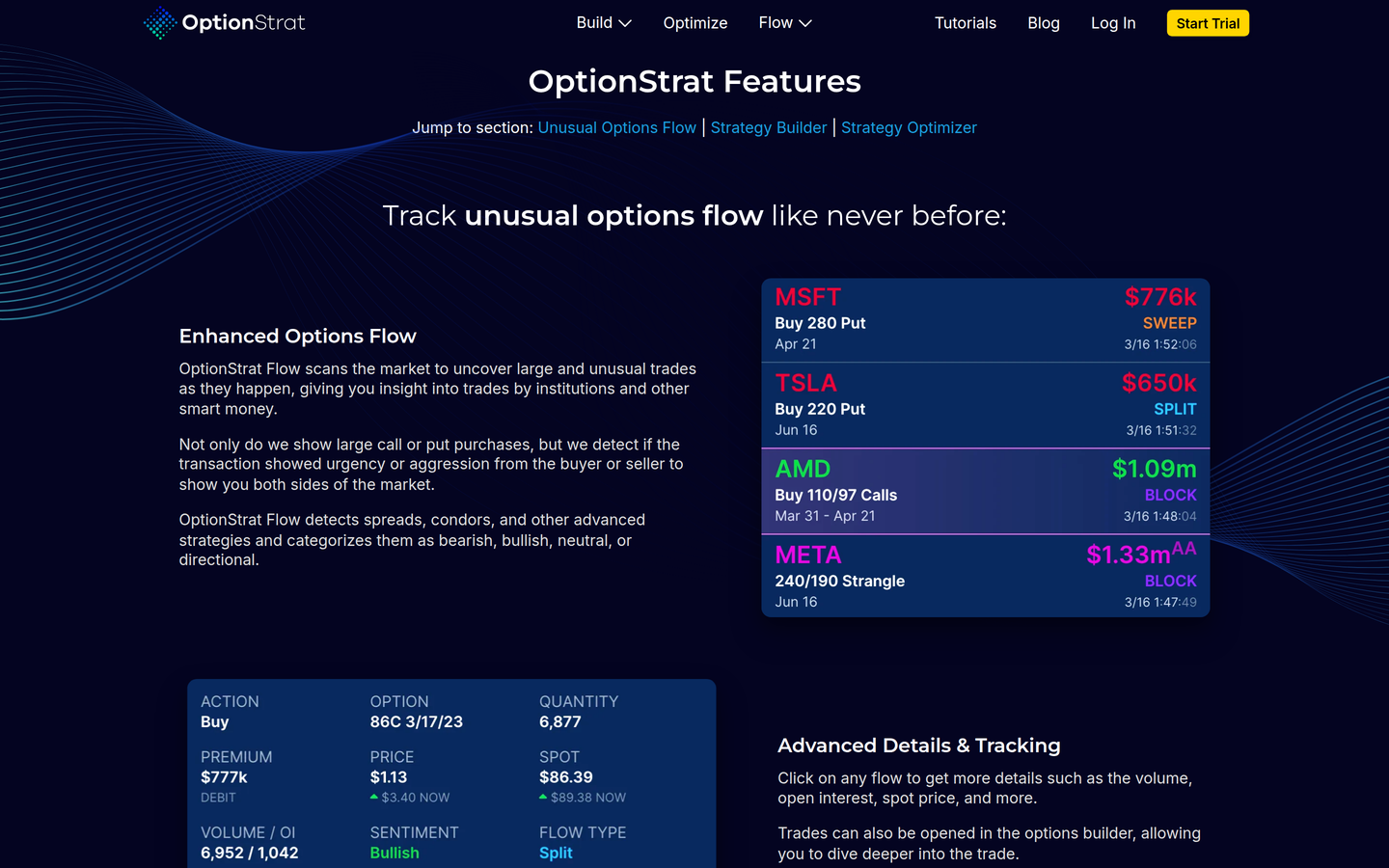
Official Features page — Unusual Options Flow and Strategy Builder framing on OptionStrat (not a competitor shot; captured 2026-09-18).
Neighbors on this directory for related jobs include TradingView, Cheddar Flow, and Unusual Whales. This is not a ranking. These are neighboring listings. We do not invent star ratings. We do not claim OptionStrat is better.
| OptionStrat | TradingView | Cheddar Flow | Unusual Whales | |
|---|---|---|---|---|
| Status on this directory | Live review | Live review | Live review | Live review |
| Job | Visualize an options payoff; scan unusual options flow as an extra job | Chart and screen stocks | Scan unusual options flow | Scan unusual options flow |
| What official pages describe | Interactive builder, 50+ templates, optimizer, OPRA data, unusual-flow feed | Supercharts, screeners, Pine Script, optional broker routing | Live options-flow tape, filters, Cheddar AI; Pro adds dark pool, gamma exposure, Power Alerts | Live US options-flow tape, dark pool, politician trades, GEX, calculator, screeners, alerts, Discord; API sold separately |
| Price captured here | Free (15-min delay) / Live Tools $39.99/mo / Live Flow $99.99/mo; Annual $419.99/yr / $999.99/yr (2026-09-18) | Free + annual specials (see the TradingView review) | Standard $0 for 7 days then $85/mo / Professional $99/mo / Pro Annual $75/mo | Free (options flow 2 trading days late) / Retail Basic $50/mo / Retail Pro $75/mo / Retail Max $120/mo; annual $504 / $756 / $1,224 |
| Canada | Canadian-listed coverage unverified; US-listed OPRA focus | Canada markets page and TSX-family widget docs; unnamed Canadian retail brokers unverified | Canadian-listed coverage unverified | Canadian-listed coverage unverified; US-listed OPRA focus |
TradingView is charting and screening software, not a payoff-diagram product. Unusual Whales and Cheddar Flow are flow software. On OptionStrat, the builder is the center and flow is an extra job. For a Keep / Gain / Lose map of unusual options flow tape neighbors (not a ranking): where OptionStrat’s flow seat is an extra job, not the Keep row: see Unusual Whales alternatives. For a neighboring form-driven payoff calculator listing rather than an interactive builder, see Options Profit Calculator alternatives. For browser options analytics / IV / earnings screens rather than a builder or a live tape, see Market Chameleon. For a two-way trader split that unmixes payoff diagram vs flow tape, see OptionStrat vs Unusual Whales. For a dedicated two-way tape split, see Cheddar Flow vs Unusual Whales. For a four-way tape vs context split, see Unusual Whales vs Cheddar Flow vs Tradytics vs Quant Data. For a Keep / Gain / Lose job-fit map of neighboring payoff / options-structure listings (not a ranking), see OptionStrat alternatives. None of those rows is a recommendation to switch, and none is a claim that OptionStrat wins the job.
Related comparisons
-
OptionVue (free calculator with Greeks) for a free Black-Scholes calculator neighbor
-
Compare OptionStrat and Unusual Whales to separate the payoff builder from a flow tape
-
OptionStrat alternatives for other payoff and strategy tools
-
Compare Quant Data and Unusual Whales if the flow feed is what you are after
-
Visualize an options payoff for every payoff tool on this directory
Verified features
Sourced from optionstrat.com, optionstrat.com/features, optionstrat.com/membership, optionstrat.com/pro-users, optionstrat.com/optimize, optionstrat.com/flow, and optionstrat.com/tutorials. Re-verified 2026-09-18. We do not list features we could not confirm on those pages.
Strategy builder (publicly described)
- Build a strategy from a ticker, expiration, and strike without scrolling a full chain as the primary UI.
- Stats listed: cost or credit, maximum potential profit and loss, breakeven prices, estimated P/L as table or graph.
- Immediate updates when strikes are dragged or implied volatility is changed.
- More than 50 strategy templates, with setup chart and description.
- Custom strategies, including underlying stock (example given: covered calls) and multiple expirations (example given: double diagonals).
- Share a saved trade via a unique link.
- Track saved trades with “total return” and “today’s return” as labeled stats on the product page.
- Close saved trades; OptionStrat describes this as a way to practice by entering and exiting without, in their words, “risking real money.” That is paper tracking inside the app, not a brokerage account.
Strategy builder items OptionStrat labels as membership benefits
- Real-time, auto-updating data
- Chance of profit (a labeled metric on the product; not a promise of profit)
- Combined (net) greeks, including greeks charted over time
- Future greeks in the table and chart
- Commission inputs on calculations
- Historical IV charts
- Market events: breaking news on large price moves; earnings dates and times; ex-dividend dates in the P/L table
- Volume overlay of active call and put strikes
- Extra saved-strategy tracking: high and low reached so far, and a historical chart; export of saved strategies
Optimizer (publicly described)
- Inputs listed: a sentiment (examples: bearish, bullish) or a target price; a target expiration date; a preference framed as maximizing return, maximizing chance, or a mix.
- Searches “thousands of potential trades” and ranks results by those metrics.
- Official homepage: “The strategies are ranked by best return or best chance.”
We report that ranking as a product behavior, not as evidence that the top result is a good trade.
Unusual options flow (publicly described)
- Scans for large and unusual trades as they happen.
- Describes detecting urgency or aggression from buyer or seller.
- Detects multi-leg structures such as spreads and condors and categorizes them as bearish, bullish, neutral, or directional.
- Click-through details listed: volume, open interest, spot price, and more.
- A flow row can be opened in the options builder.
- Custom filters; saved filters and alerts are listed as membership benefits.
- Alert performance tracking (high, low, current, graph) listed as a membership benefit.
- Live Flow plan also lists historical searching, a live newsfeed, and “Congress & insider trades.”
Data (publicly described)
- OptionStrat states that it charts trades using data from the Options Price Reporting Authority (OPRA).
- Free users: data “lags by only 15 minutes.”
- Premium accounts: “live auto-refreshing data.”
- Live data restriction for professional users, as noted above and on the pro-users page.
Futures
- A 6 October 2023 OptionStrat blog post announced futures-options support, including examples such as /ES and /NQ, with 15-minute delayed futures data for subscribers.
- The current Live Tools plan still lists “Futures — 15-min delayed futures data.”
- The current roster of futures roots, and whether every listed root still works, is unverified beyond that blog post and the plan bullet.
Ratings displayed on the vendor site
- The membership page stated OptionStrat is rated 4.6 out of 5 with 3.3k reviews. That is vendor-displayed social proof, not a rating from this directory.
Canada note
This directory is written with readers in Canada as well as the United States.
US-listed focus. OptionStrat’s November 2020 public launch post described the product as a tool “for creating and visualizing option trades on U.S. stocks.” Current public pages emphasize OPRA options data and US-style futures roots. We did not find an official page stating that Canadian-listed options (TSX equities, Montréal Exchange options, CDRs, and similar) are supported. Canadian-listed coverage is unverified. Assume US-listed underlyings unless OptionStrat shows you a specific Canadian symbol yourself.
Canadian broker compatibility. We found no official OptionStrat page that lists Canadian brokers, Questrade, Wealthsimple, TD Direct Investing, or Interactive Brokers Canada as integrated execution partners. Any claim that OptionStrat “works with” a named Canadian broker would be invented. Compatibility with a specific Canadian broker is unverified. Named Canadian-broker integrations are unverified. Because the public product is analysis software, many people use a visualizer in one browser tab and a broker in another — that workflow is a description of two separate products, not a verified integration.
Currency (CAD vs USD), registered-account constraints (TFSA, RRSP), and Canadian tax treatment of options are outside this review.
Confirm pricing, data rights, and symbol coverage on the official site. We may earn a commission if you buy through links on this page: optionstrat.com.
Sources
Prefer these official URLs (capture 2026-09-18):
- optionstrat.com/membership — Free / Live Tools $39.99/mo / Live Flow $99.99/mo; Annual Save 12%! → Live Tools $419.99/yr / Live Flow $999.99/yr; 7-day trial buttons
- optionstrat.com/build — strategy builder / payoff diagram product UI
- optionstrat.com/optimize — strategy optimizer product UI
- optionstrat.com/flow — unusual options flow product UI
- optionstrat.com/features — Unusual Options Flow / Strategy Builder / Strategy Optimizer framing
- optionstrat.com/pro-users — live data licensing for professional users
- optionstrat.com/tutorials — product tutorials
- optionstrat.com/faq — billing / app / trade-through FAQ entries
Confirm pricing on the official site before you pay. Our OptionStrat links are affiliate links: optionstrat.com.
Disclosure
This page is a directory review of publicly priced analysis software, not financial advice, not a recommendation to buy a seat, and not a claim that any diagram, optimizer ranking, flow print, or plan will be profitable. OptionStrat is not listed here as a broker. We may earn a commission if you buy through links on this page. Our OptionStrat links are affiliate links: optionstrat.com. Prices and features change — confirm on optionstrat.com/membership before you pay.
FAQ
- Is OptionStrat free?
- Yes. Free is $0 with data that “lags by only 15 minutes” and limited access to each feature. That is enough to open a structure and see a payoff diagram in the browser. It is not Live Tools or Live Flow. Pay when you want live auto-refreshing prices, membership-tier builder extras (chance of profit, net greeks, commissions, market events, volume overlay, saved-strategy tracking, 15-minute delayed futures), or the Live Flow feed (live flow, saved filters, alerts, historical searching, live newsfeed, Congress and insider trades). Paid plans show 7-day trial buttons. For neighboring payoff tools, see OptionStrat alternatives.
- What does OptionStrat cost?
- OptionStrat membership pricing: Free is $0 with 15-minute delayed data and limited access. Live Tools is $39.99 a month. Live Flow is $99.99 a month. The annual toggle labeled “Save 12%!” shows Live Tools at $35.00 a month billed at $419.99 a year, and Live Flow at $83.33 a month billed at $999.99 a year. Prefer Free when a delayed diagram is enough. Prefer Live Tools when live builder prices and membership extras are the job. Prefer Live Flow when the unusual-flow feed is also the job on the same vendor. Live data is stated as available only to individual and non-professional users. Confirm the pro-users policy before you pay. Confirm on OptionStrat’s membership page before you pay.
- Is OptionStrat worth it?
- OptionStrat is worth it when you want to visualize an options payoff in a browser. You get an interactive strategy builder, 50+ templates, and the ability to drag strikes and adjust IV. Then pay Live Tools at $39.99 a month or Live Flow at $99.99 a month (annual $419.99 a year or $999.99 a year) for live prices, builder extras, or the flow feed. Skip if you want OptionStrat to be the broker (order routing is unverified), need live exchange data under a professional license (vendor limits live data to non-professionals), need verified Canadian-listed options chains, or your primary job is Supercharts or a flow-first live tape. This directory review is a fit map, not a ranking. For neighboring tools, see OptionStrat alternatives. For a two-way split that unmixes payoff diagram vs flow tape, see OptionStrat vs Unusual Whales.
- Is the free plan enough?
- Yes for trying the builder. Free has delayed data (15 minutes) and limited access to each feature, enough to open a structure and see a payoff diagram. Pay when you want live auto-refreshing prices, the Live Tools builder extras (chance of profit, net greeks, commissions, market events, volume overlay, saved-strategy tracking, 15-minute delayed futures), or the Live Flow feed (live flow, saved filters, alerts, historical searching, live newsfeed, Congress and insider trades). On the annual toggle (Save 12%!), Live Tools is $35.00 a month billed at $419.99 a year, and Live Flow is $83.33 a month billed at $999.99 a year. Paid plans show 7-day trial buttons.
- How is OptionStrat different from Unusual Whales?
- Both help options traders on related jobs. This is not a ranking. OptionStrat centers an interactive payoff diagram and strategy builder (Free with 15-minute delay; Live Tools $39.99 a month; Live Flow $99.99 a month; annual $419.99 a year or $999.99 a year), with optimizer and unusual-flow as extra jobs on the same site. Unusual Whales centers a live US-listed unusual-options-flow tape (Free with options flow 2 trading days late; Retail Basic, Pro, and Max at $50, $75, and $120 a month; annual $504, $756, and $1,224), with dark pool, politician trades, GEX, and a separate API. Prefer OptionStrat when seeing the diagram of a structure is the job. Prefer Unusual Whales when scanning a live flow tape is the job. Do not treat OptionStrat’s Live Flow plan as a full Unusual Whales swap, or Unusual Whales as a diagram-first builder. For the dedicated two-way split, see OptionStrat vs Unusual Whales. For neighboring payoff tools, see OptionStrat alternatives. This page does not rank them.
- Does it work in Canada?
- Yes as analysis software in a browser. You can open OptionStrat from Canada. The product focus on pages we reviewed is US-listed underlyings and OPRA options data. We did not find an official page stating that Canadian-listed options (TSX equities, Montréal Exchange options, CDRs, and similar) are supported. Canadian-listed coverage is unverified. We found no official OptionStrat page that lists Canadian brokers, Questrade, Wealthsimple, TD Direct Investing, or Interactive Brokers Canada as integrated execution partners. Named Canadian-broker integrations are unverified. Do not infer them. Currency (CAD vs USD), registered-account constraints (TFSA, RRSP), and Canadian tax treatment of options are outside this review.
- Can I trade through OptionStrat?
- Unverified. OptionStrat is not listed here as a broker. OptionStrat’s own FAQ includes the question “Can I trade through OptionStrat?” Public marketing pages we reviewed describe visualization, optimization, saved-trade tracking, and flow, not account opening or order routing. Closing a saved trade inside the app is described by OptionStrat as a way to practice without, in their words, “risking real money.” That is paper tracking inside the app, not a brokerage account. Do not treat this page as a how-to for placing trades.