

TradingView Review
Browser, desktop, and mobile Supercharts with screeners, alerts, and Pine Script.
Reviewed
Quick verdict
TradingView
Start here if you want free charts and a screener in the browser. Pay when you need more alerts, more indicators on one chart, or server-side Pine.
Sourced fit
- Supercharts on web, desktop, and mobile, with plan-capped charts per tab, indicators, alerts, and historical bars.
- Stock, ETF, DEX, and crypto screeners; the pricing page lists 150+ exchanges from 50+ countries.
- Pine Script for custom indicators and strategy backtesting; paper trading and trade-through-selected-brokers are listed.
Sourced limits
- Paid plans do not include exchange real-time data fees; extra feeds are sold separately.
- The pricing page states only the Ultimate plan is available for professional users.
- Monthly-billing stickers are higher than annual specials ($14.95 / $34.95 / $69.95 / $239.95 vs $12.95 / $29.95 / $59.95 / $199.95 billed annually).
- Not a broker. Execution depends on a connected broker that TradingView lists for your account.
This directory may earn a commission if you buy through links. That does not change the verdict.
Pricing
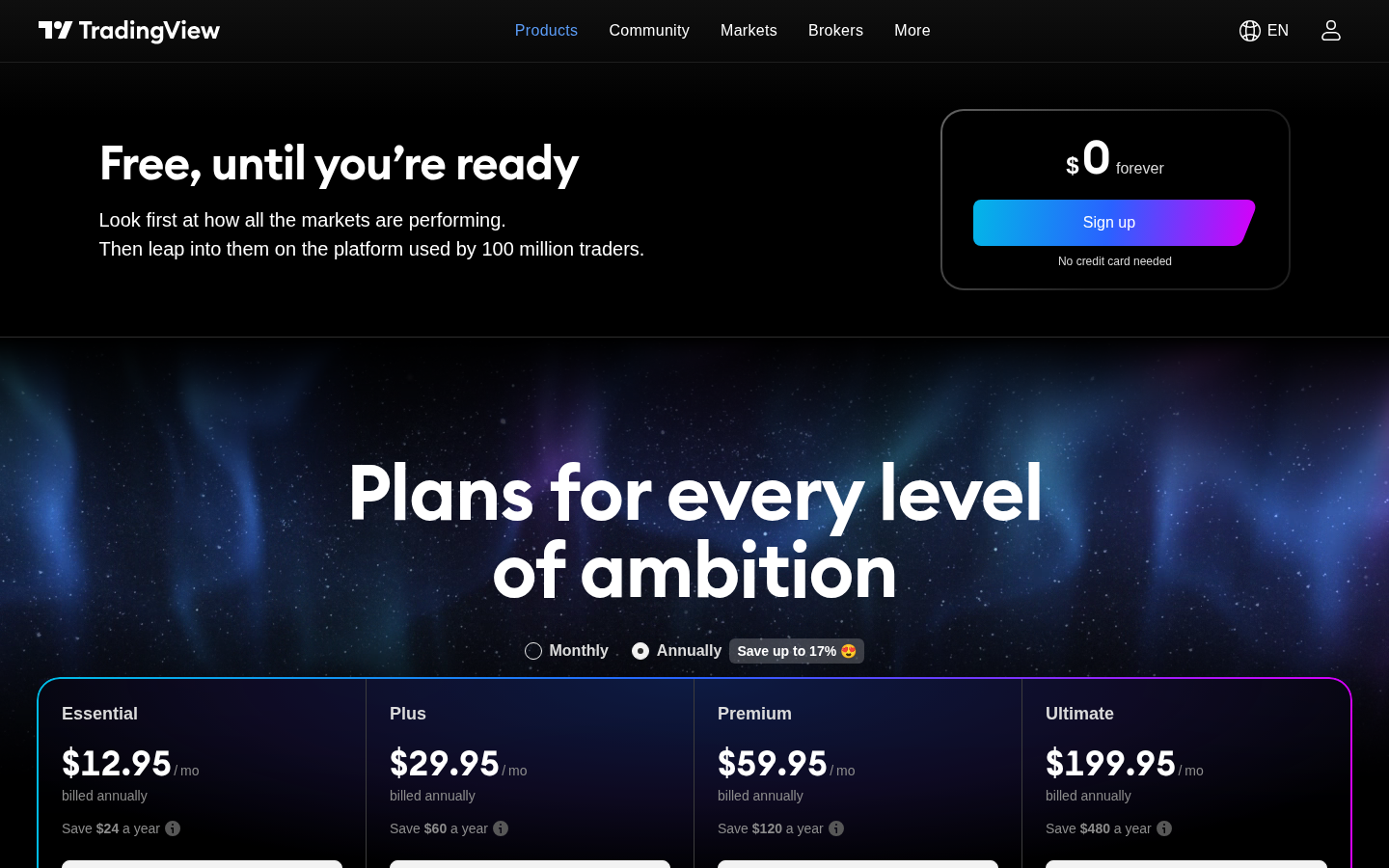
Headline prices on tradingview.com/pricing, shown billed annually and labeled Special price (monthly stickers are higher). Exchange real-time data is extra. Confirm on the official site before you pay.
Short answer: TradingView Basic is free forever, and you don’t need a card to use it. Paid plans cost $12.95 (Essential), $29.95 (Plus), $59.95 (Premium) or $199.95 (Ultimate) a month billed yearly, or $14.95 to $239.95 if you pay month to month. Essential, Plus and Premium come with a 30-day free trial and Ultimate with 14 days. Prices are from tradingview.com/pricing, captured 2026-09-18 and checked again 2026-09-30. Plan table: TradingView pricing.
Verdict
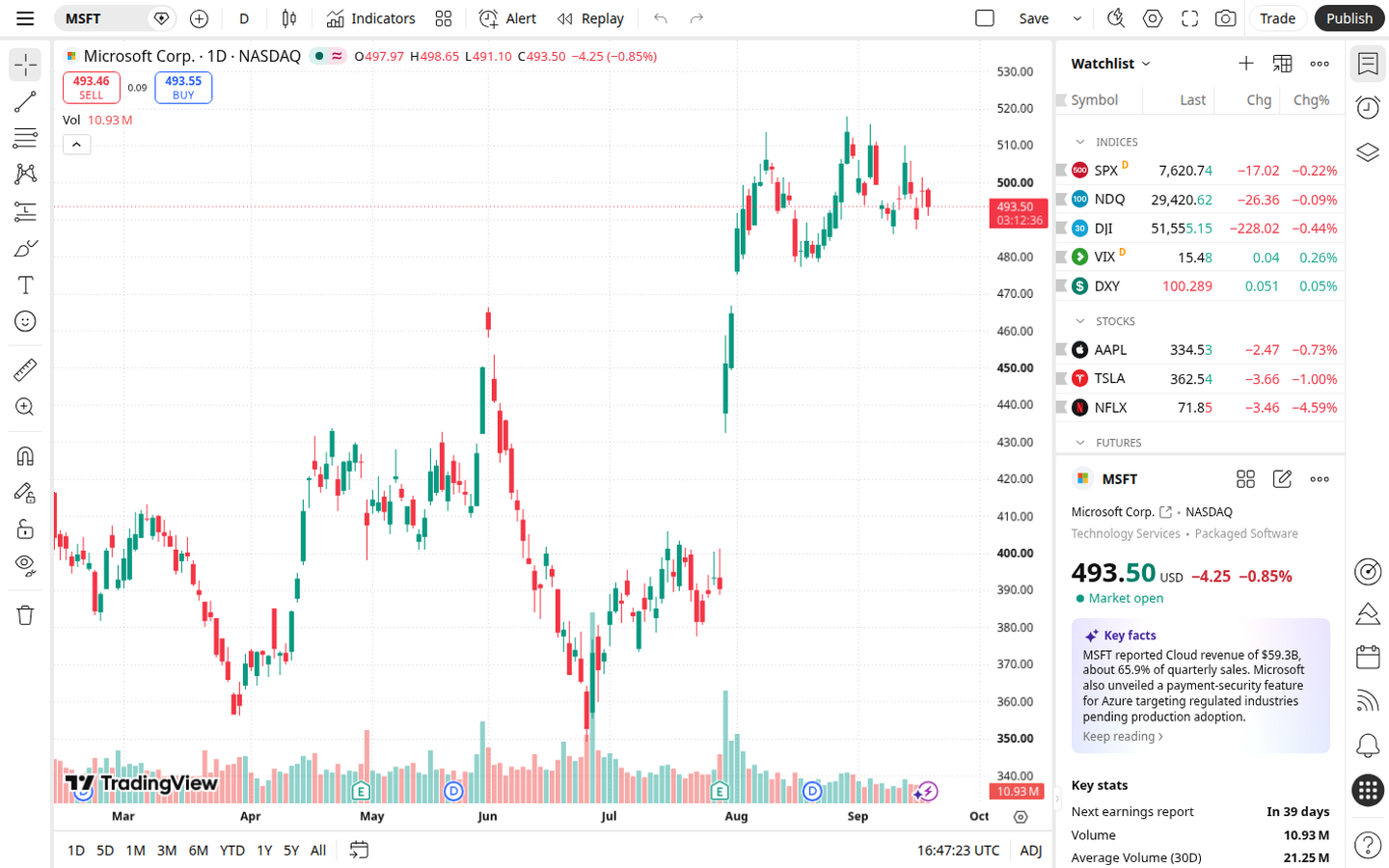
Official Supercharts product UI: MSFT workspace (captured 2026-09-18).
TradingView is charting and screening software. Supercharts run in the browser, on desktop, and on mobile. Public product and pricing pages describe screeners, watchlists, alerts, Pine Script®, paper trading, and the option to connect selected brokers and send orders from the chart.
The public Basic plan is $0 forever with “No credit card needed,” one chart per tab, two indicators, 5K historical bars, and three price alerts. That is enough to open a chart and run a screener. Paid plans raise those caps; the paid-plan cards list “No ads.” Re-verified on tradingview.com/pricing (2026-09-18): Essential $12.95 a month, Plus $29.95 a month, Premium $59.95 a month, Ultimate $199.95 a month, all shown billed annually under “Special price.” Standing annual-billed cards were unchanged vs the 2026-09-13 capture.
This is a directory listing of analysis software, not a brokerage of its own, not a signal service from this directory, and not a source of investment advice. TradingView’s own help pages describe discovering integrated brokers, connecting an account, and placing orders on Supercharts, that is broker execution through a third party, not TradingView holding your cash. This directory does not treat a public idea, script, or community post as a recommendation.
We are not saying TradingView is the best charting tool, the best screener, or the best purchase. We are not saying it will make a strategy profitable.
The pricing page used the marketing line “the platform used by 100 million traders.” That is vendor copy, not a measurement we audited.
Best for
- Chart and screen stocks in a browser or an app. Public pages describe Supercharts, drawing tools, built-in plus community indicators, watchlists, and stock / ETF / DEX / crypto screeners.
- Starting free. Basic is $0. You can look at a chart and filter a universe without a paid seat.
- Pine Script users who want custom indicators and strategy backtesting that run on TradingView’s servers, plus the community script library (pricing page: 100K+ community-powered indicators; Pine docs: more than 150,000 Community Scripts).
- Optional paper trading or sending orders through a connected broker that TradingView lists for your account. Those are extra jobs, not reasons to call the tool number one, and not a broker comparison from this directory.
- Readers in Canada who want Canadian-listed coverage that official pages already name (Canada markets page; TSX / TSXV / NEO / CSE in widget docs). That is not “US-only.” It is also not a claim about Wealthsimple, TD, or other unnamed brokers.
Skip if
- You want TradingView to be the broker. This is not a broker comparison. Execution, if you use it, is through a connected broker that TradingView lists for your account.
- You want stock picks, alerts-as-advice, or a ranked “best trade.” Community ideas and scripts are other users’ work. They are not this directory’s ranking.
- Professional / commercial users who only want a cheap Essential / Plus / Premium seat. The pricing page states that only the Ultimate plan is available for professional users. TradingView’s professional-status help article says the same. Confirm current policy with TradingView; subscriber status is defined in that article and in TradingView’s terms.
- Your primary job is options payoff diagrams or unusual-flow scanning. Payoff diagrams belong on visualize an options payoff and on the OptionStrat listing. Unusual options flow belongs on scan unusual options flow and on listings such as Unusual Whales and Cheddar Flow. Cheddar Flow’s charts are powered by TradingView, so our Cheddar Flow review is a good next read if you want a flow tape next to familiar charts. For a free payoff calculator with no signup, see CallPutHub. If you mostly want to plan and log options trades, see journal your options trades. TradingView is not a payoff-diagram or live-tape product.
- You assume a paid TradingView plan includes live exchange data. Official help states that paid plans do not cover exchange real-time data fees; extra feeds are sold separately (or, for some brokers, verified from an existing broker data entitlement).
What you get
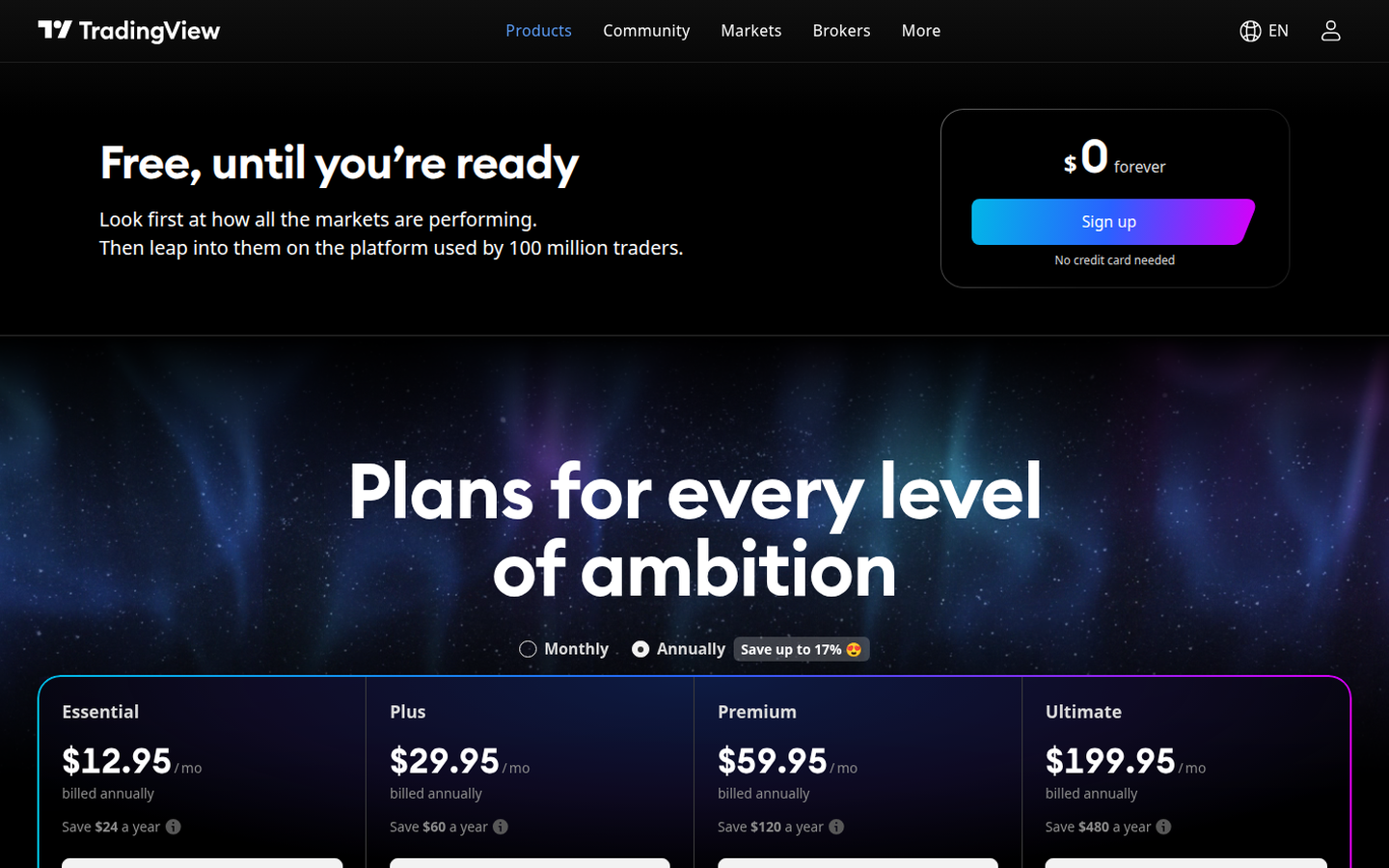
Official pricing: Basic $0 forever plus Essential / Plus / Premium / Ultimate annual specials (captured 2026-09-18).
Headline figures on tradingview.com/pricing. The page defaulted to Annually, labeled “Special price”, billed annually, with a control “Save up to 17%.” Those effective monthly rates, billed annually, are the prices this listing shows. A Monthly toggle exists; monthly-billing sticker prices (not the annual fields) were $14.95 / $34.95 / $69.95 / $239.95 for Essential / Plus / Premium / Ultimate, confirmed via the pricing-page annual-vs-monthly comparison tooltips (e.g. Essential full annual $155.40 against $179.40 with regular monthly payments) and the page’s schema.org Offer prices. Do not mix those monthly stickers into the annual price list without labeling. Capture 2026-09-18.
| Basic (Free) | Essential | Plus | Premium | Ultimate | |
|---|---|---|---|---|---|
| Public price as shown | $0 forever; “No credit card needed” | $12.95 a month billed annually; “Save $24 a year” | $29.95 a month billed annually; “Save $60 a year” | $59.95 a month billed annually; “Save $120 a year” | $199.95 a month billed annually; “Save $480 a year” |
| Trial as shown | None | 30 days | 30 days | 30 days | 14 days |
| Ads | Not listed as “No ads” | Paid-plan cards list “No ads” | Paid-plan cards list “No ads” | Paid-plan cards list “No ads” | Paid-plan cards list “No ads” |
| Charts per tab | 1 | 2 | 4 | 8 | 16 |
| Indicators per chart | 2 | 5 | 10 | 25 | 50 |
| Historical bars | 5K | 10K | 10K | 20K | 40K |
| Active price alerts | 3 | 20 | 100 | 400 | 1,000 |
| Active technical alerts | None | 20 | 100 | 400 | 1,000 |
| Active watchlist alerts | None | None | None | 2 | 15 |
| Minute history (Bar Replay) | None | 180 days | 365 days | All | All |
| Second history | None | None | None | All | All |
| Tick history | None | None | None | None | 7 days |
Plans, data, and billing extras
Also listed on that page:
- Enterprise: “Need 100+ subscriptions? Get in touch.”
- Sales tax may be added depending on location. TradingView, Inc. is described as registered for sales tax in certain countries.
- Extra real-time exchange data is billed separately (see Data under Verified features).
- FAQ: cancel anytime; paid service stays active for the paid term; a canceled trial stops immediately.
- FAQ refunds: annual plans only, requested within 14 calendar days. No refunds for upgrades to a more expensive plan, monthly plans, or market data, even if cancelled the same day. Chargeback / dispute filers are stated as ineligible.
- Payment methods listed: major credit cards, PayPal, Apple Pay, crypto (including Binance Pay via Triple-A); mobile apps also use App Store / Google Play methods.
Prices change. Confirm on TradingView’s pricing page before you pay. This directory does not sell TradingView. We may earn a commission if you buy through links on this page.
How it works
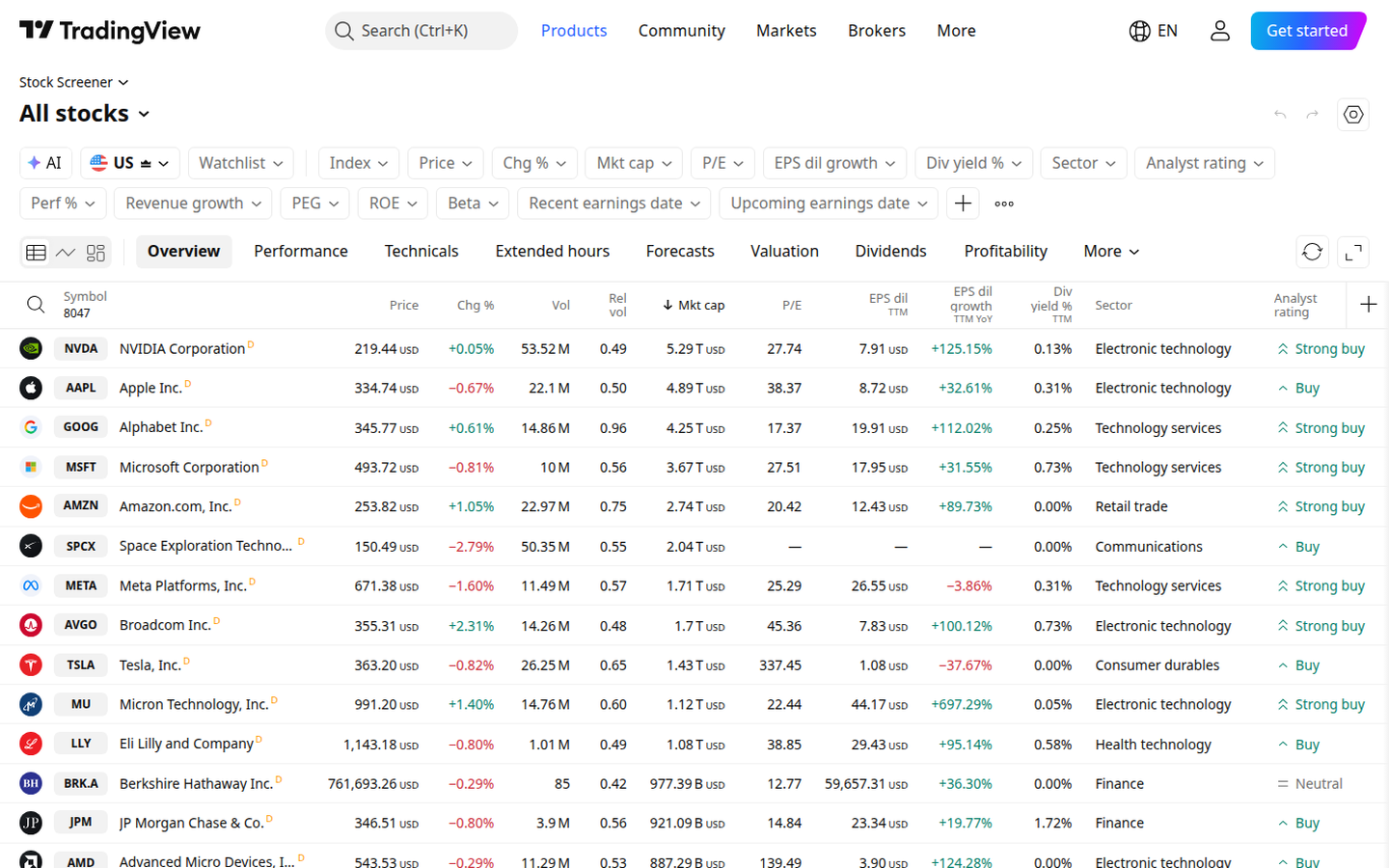
Official Stock Screener product UI (captured 2026-09-18).
- Open Basic for free on tradingview.com / pricing, $0 forever, no credit card needed on the Basic card we captured.
- Open Supercharts in the browser (or desktop / mobile apps). Basic: 1 chart per tab, 2 indicators, 5K historical bars, 3 price alerts.
- Screen and watch. Stock / ETF / DEX / crypto screeners; watchlists (symbol cap 30 on Basic; 1,000 on paid plans per the comparison table). Screener auto-refresh: 1 minute on Basic; “10 sec / 1 min” on paid plans.
- Alert and script (optional). Raise alert caps on paid seats. Write Pine Script indicators / strategies that run on TradingView’s servers; use Bar Replay with plan-capped history depth.
- Optional paper trading or broker connection. Paper trading is simulated practice with virtual funds. Connecting a broker TradingView lists for your account is optional if you want to send orders from the chart, not required for charting or screening.
We tested it
On Oct 13, 2026 we used TradingView without signing in. We made no account, entered no card, and started no trial. The pages showed “Get started” and “Upgrade” the whole time, so this is what anyone sees before making a free account. Market figures below are a snapshot from Oct 13 and will be different when you look.
The SPY chart
The SPY chart loaded with price bars, volume, a watchlist, and key stats. Switching from the daily view to the 1 hour view worked with no prompt. The quick range buttons (1 day up to all history) were there too. SPY itself showed no delay label, but some watchlist quotes did: the S&P 500 index was marked as delayed 10 minutes and VIX as delayed 15 minutes.
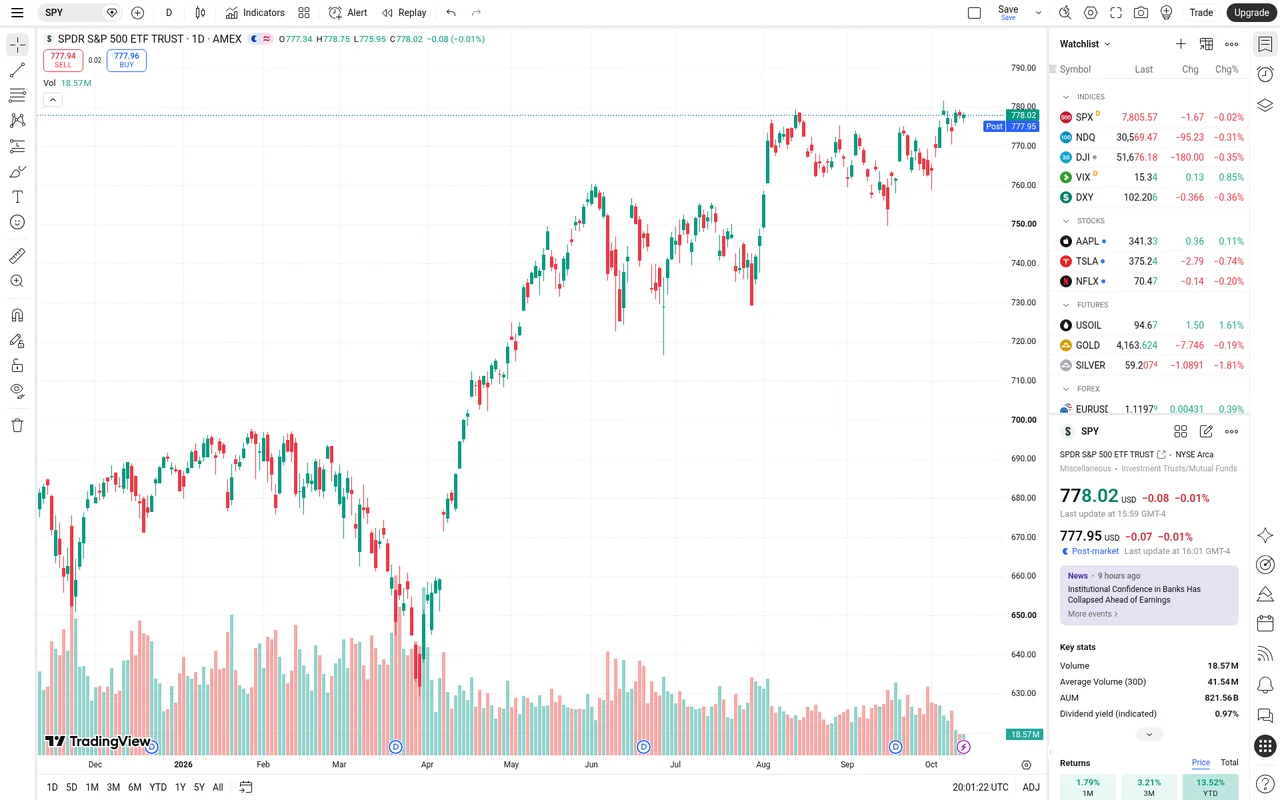
SPY daily chart without an account, Oct 13, 2026.
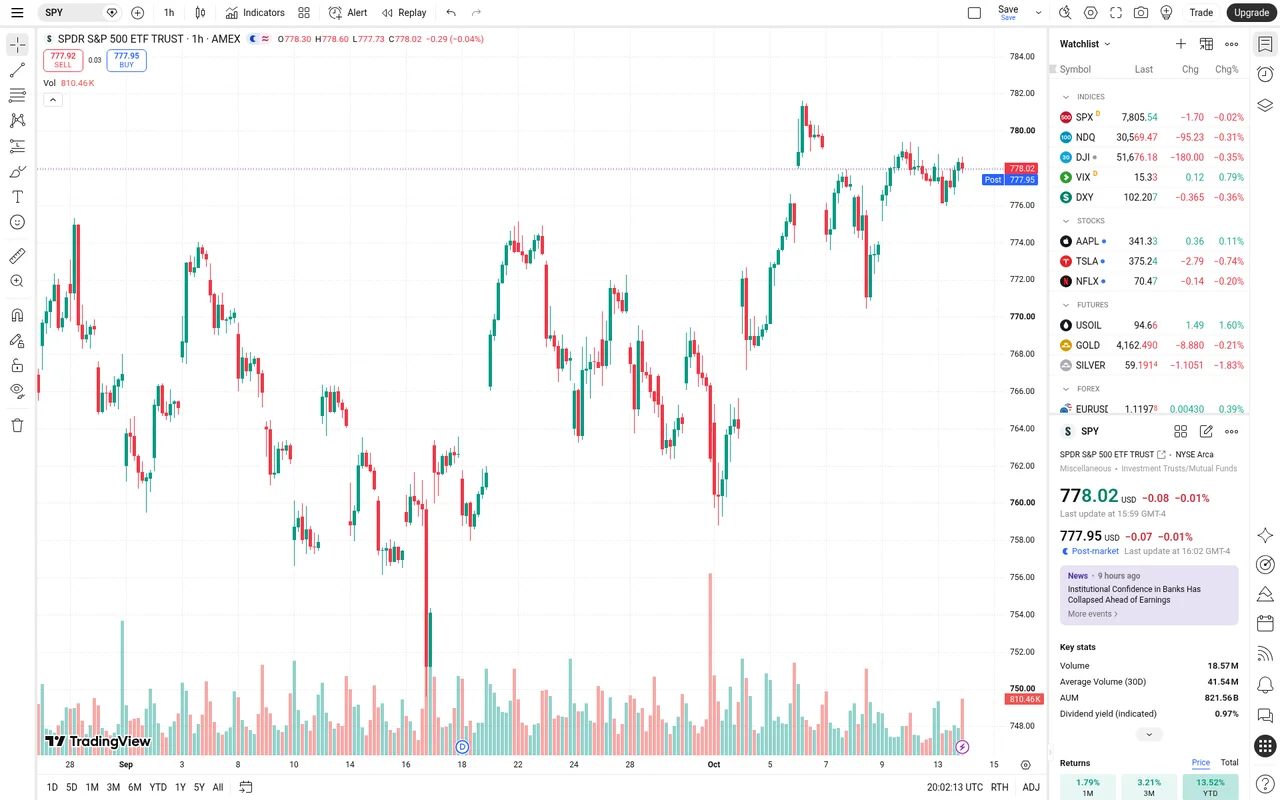
The same SPY chart switched to the 1 hour view, no prompt, Oct 13, 2026.
Indicators and drawings need a free account
This is the big limit when you are signed out. We tried to add RSI and VWAP, two of the most basic built-in indicators. Both times a box came up that said “You’ll need a free account to access.” No indicator was added.
Drawing a trendline was blocked the same way. A prompt said to join for free to use the trendline and every other drawing tool.
A free account fixes this, but only partly. The pricing page lists 2 indicators per chart on the free Basic plan, against 5 on Essential, 10 on Plus, 25 on Premium, and 50 on Ultimate.
Options tools
The SPY options chain opened with no prompt. It shows calls and puts side by side with delta, implied volatility, bid and ask, open interest, and volume, grouped by expiry date.
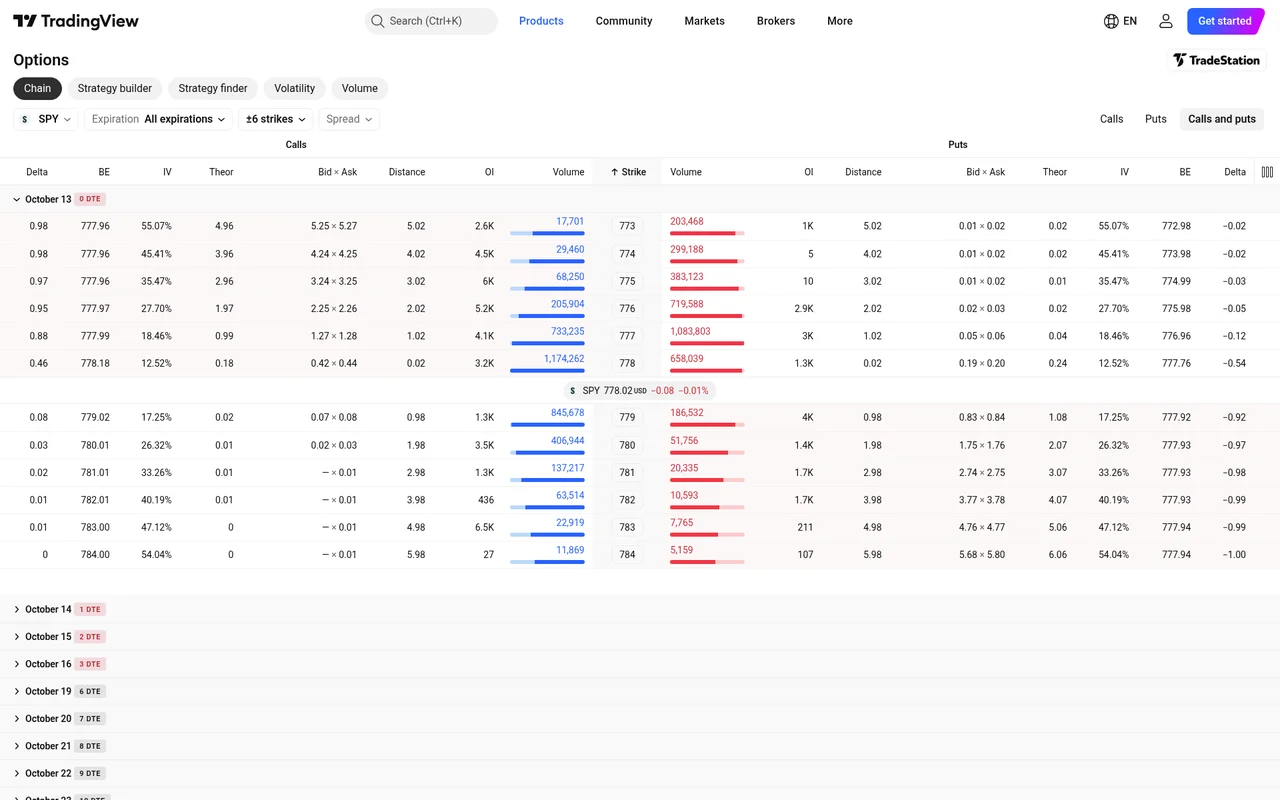
SPY options chain without an account, Oct 13, 2026.
One oddity: the main options page did not open on SPY. It opened the chain for E-mini S&P 500 futures, so you have to type SPY in yourself.
The strategy builder also worked without an account. It has ready-made templates such as long call, bull call spread, covered call, and iron butterfly. We opened the long call template on SPY. It showed the cost, max loss, breakeven, a win rate, the greeks, and a profit and loss chart. Building a strategy from scratch opened too. We did not save anything.
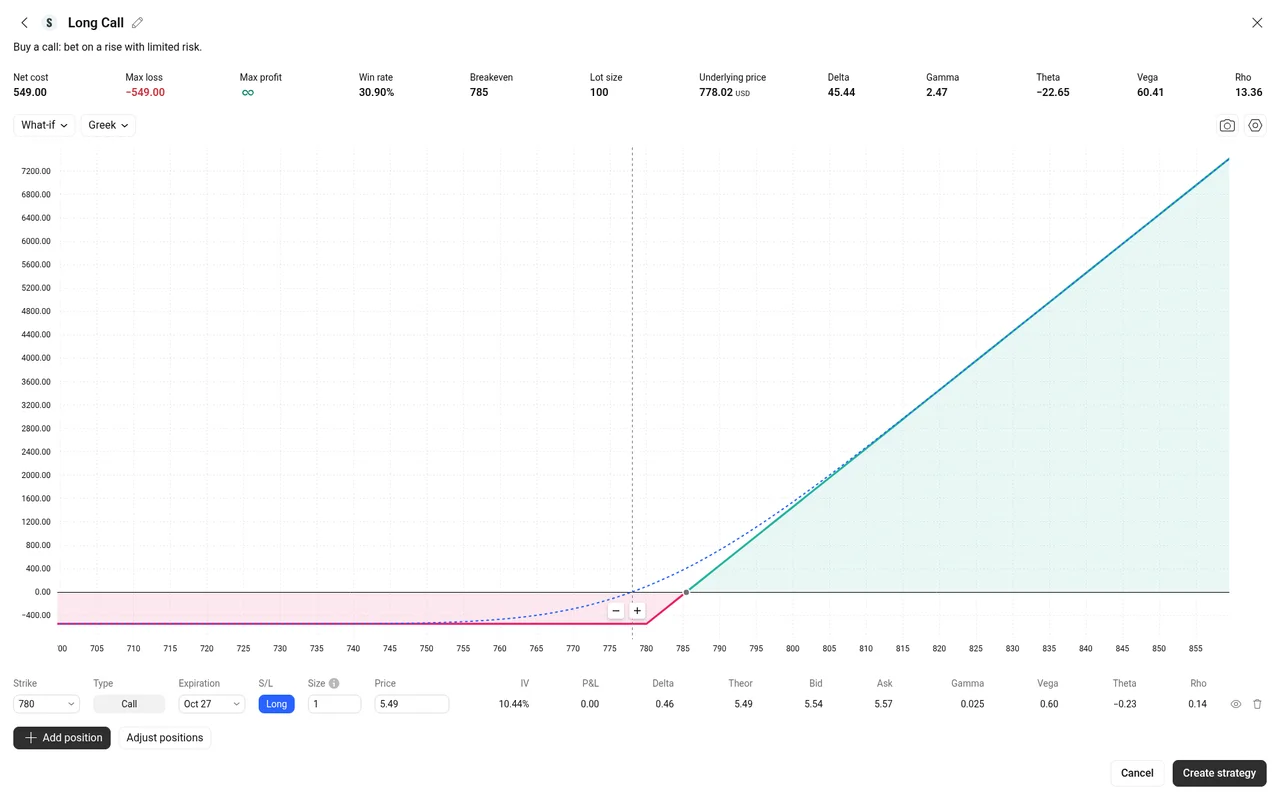
SPY long call template in the strategy builder, Oct 13, 2026.
The strategy finder also opened with no prompt. You give it a date and a price range and it lists trades with max profit, max loss, and breakeven.
The stock screener
The screener loaded with no prompt and listed 8,262 symbols. The tabs and filters we tried (sector, index, performance, technicals, and more) all worked. Every row was marked as delayed 15 minutes.
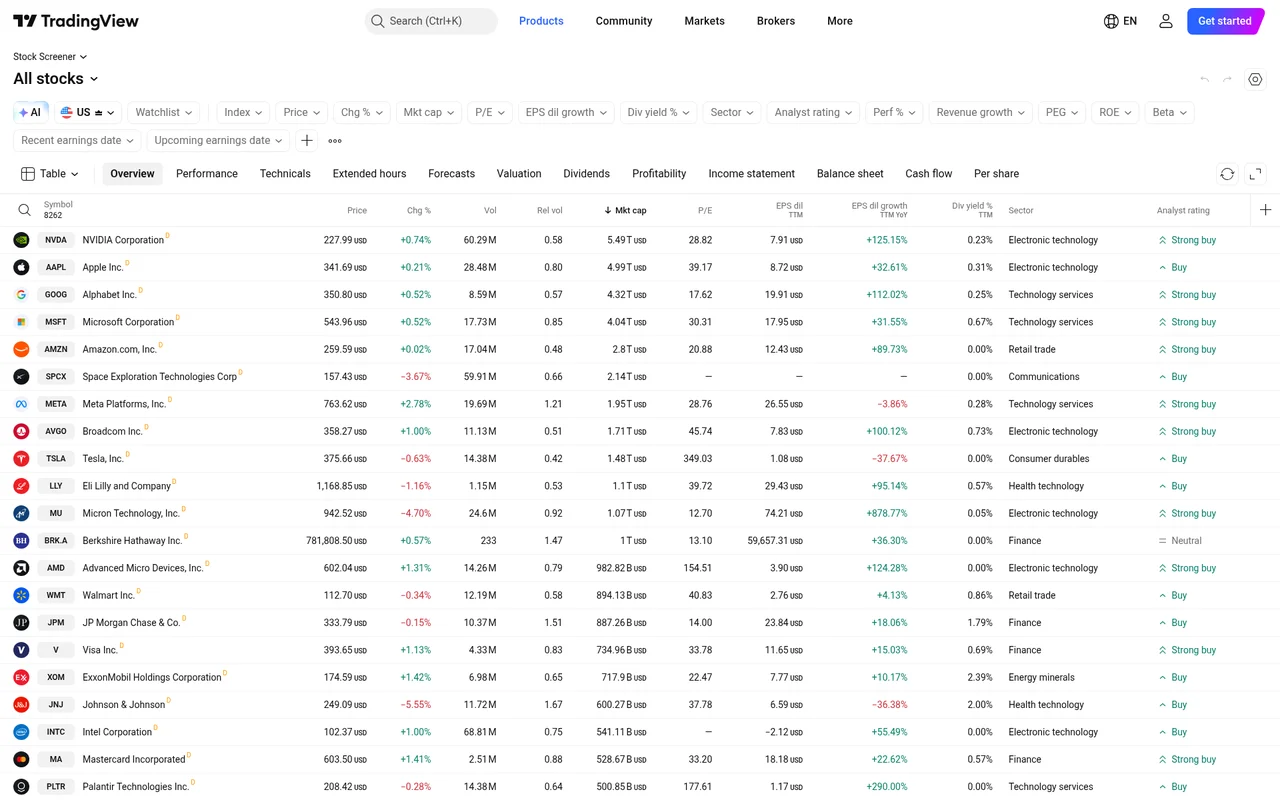
The stock screener without an account, Oct 13, 2026.
What works without an account
- The chart, including switching timeframes
- The options chain with the greeks, implied volatility, and open interest
- The strategy builder templates, with profit and loss and the greeks
- The strategy finder
- The stock screener
What needs a free account
- Adding any indicator, even RSI or VWAP
- Drawing a trendline or using any other drawing tool
- Saving anything
Prices we saw
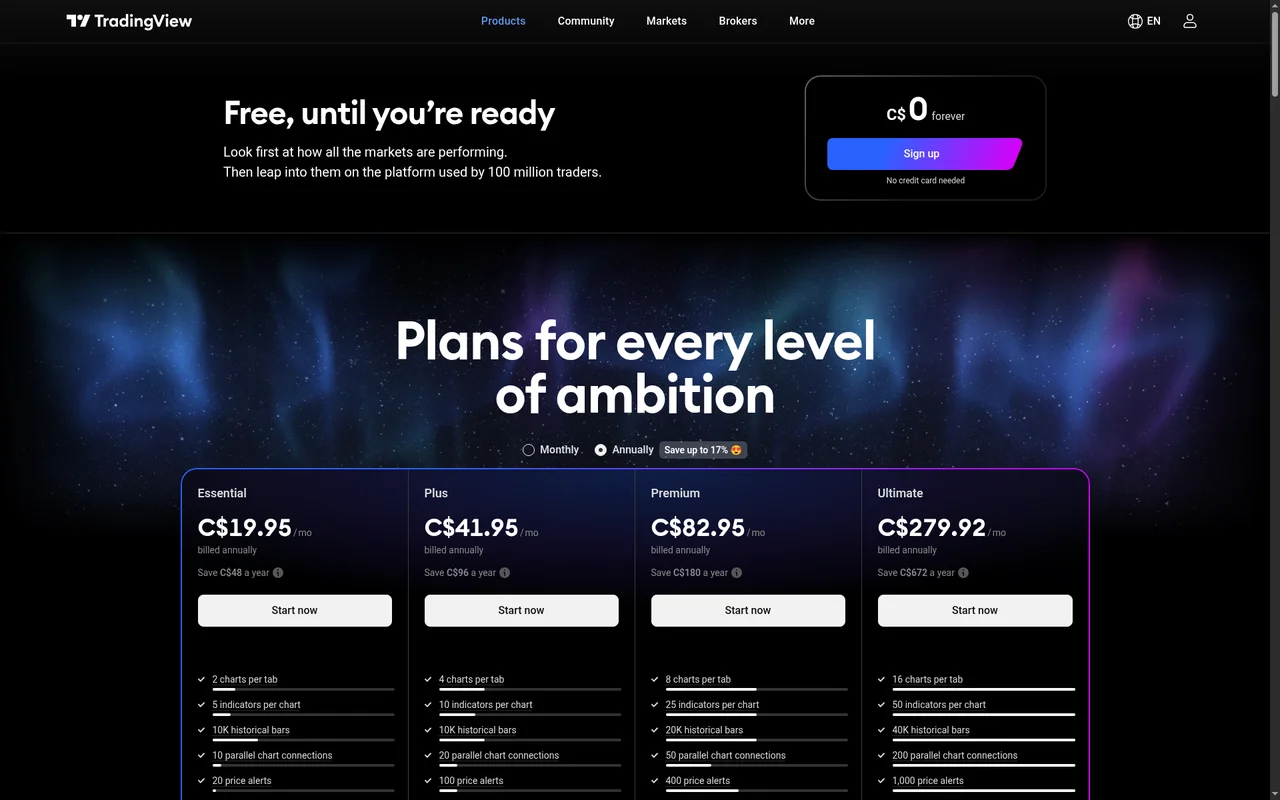
The pricing page as it loaded for us, Oct 13, 2026, in Canadian dollars.
The pricing page showed us prices in Canadian dollars, labeled as a special price. US dollar prices are different, so we have not changed the US prices listed elsewhere on this page. The plans were the same: Basic is free with no card needed, then Essential, Plus, Premium, and Ultimate. Paying yearly was cheaper than paying month to month on every paid plan. Confirm the price in your own currency on the pricing page before you pay.
Our take: you can learn a lot about TradingView without an account, especially on the options side. But a chart with no indicators and no drawings is not much use for most traders, so plan on making the free account. If you need more than 2 indicators on one chart, that is when a paid plan starts to matter.
Supercharts vs payoff / flow neighbors
TradingView centers Supercharts and screeners. Payoff-diagram builders (for example OptionStrat) center interactive strategy diagrams. Flow tapes (for example Unusual Whales) center unusual options prints. That is a product-shape contrast, not a ranking.
Watch-outs
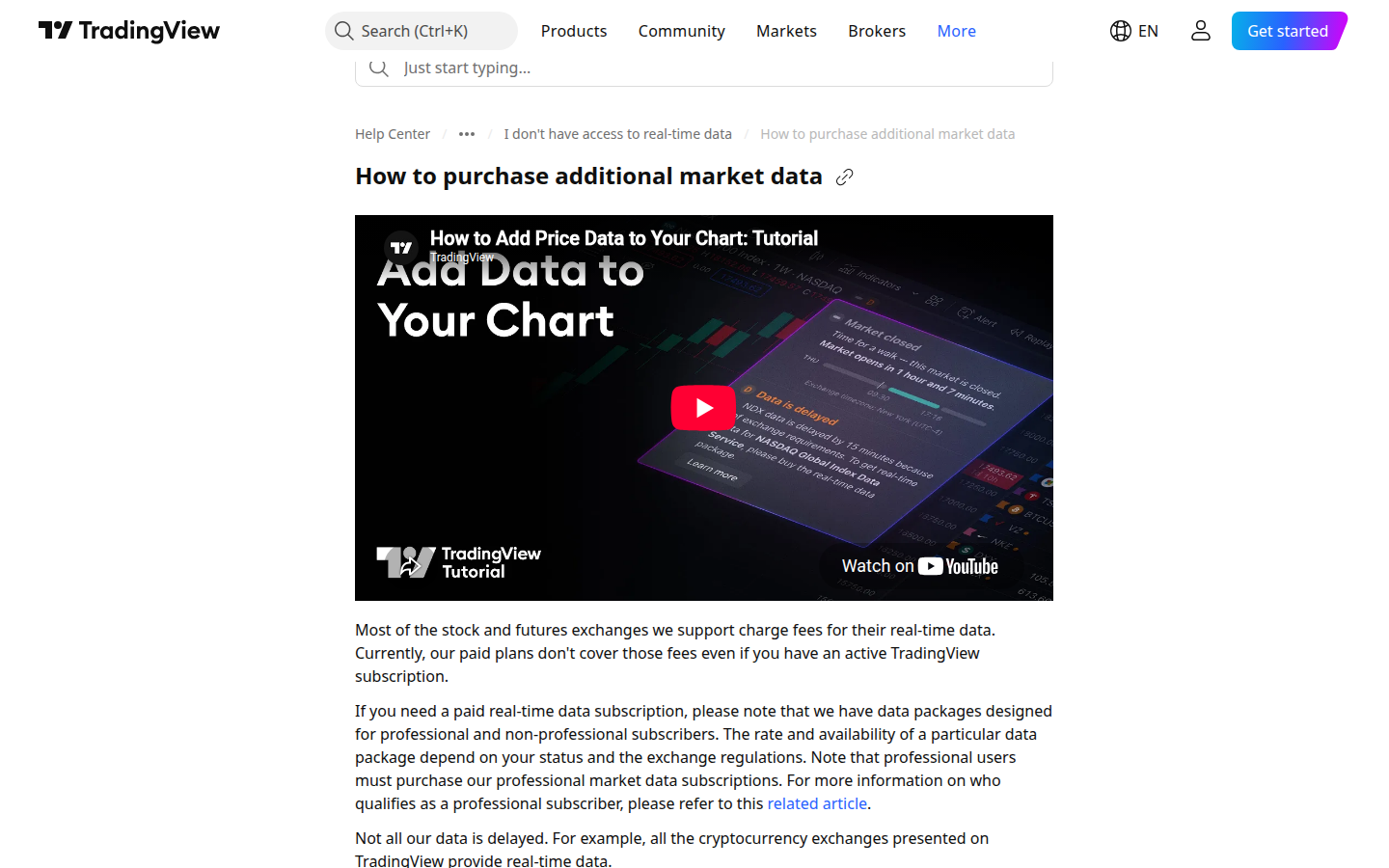
Official help: paid plans do not cover exchange real-time data fees (captured 2026-09-13).
- Paid plans do not include live exchange data. Official help: most stock and futures exchanges charge extra for real-time data; paid TradingView plans do not cover those fees. Extra feeds are sold separately (or, for some brokers, verified from an existing broker data entitlement).
- Basic has ads and tight caps. Paid-plan cards list “No ads”; Basic does not. Basic: 1 chart / 2 indicators / 3 price alerts / 5K bars.
- Only Ultimate is listed for professional users. Pricing page + professional-status help. Confirm current policy with TradingView.
- Monthly vs annual dollars differ. Annual specials (what price list stores) stay Essential $12.95 / Plus $29.95 / Premium $59.95 / Ultimate $199.95 per month billed annually. Monthly-billing stickers on the same page were Essential $14.95 / Plus $34.95 / Premium $69.95 / Ultimate $239.95 (re-verified 2026-09-18). Do not treat those as the annual fields.
- Not a broker. Execution, if used, is through a connected broker TradingView lists for your account. Questrade and Interactive Brokers are named on official pages we reviewed; Wealthsimple, TD Direct Investing, and Qtrade are unverified.
- Refunds are narrow. Annual plans only, within 14 calendar days; no refunds for monthly plans, upgrades to a more expensive plan, or market data (pricing FAQ).
- Default U.S. stock data is from Cboe Exchange and is “slightly different from that of the primary exchanges” (official help / pricing context).
Pros and cons
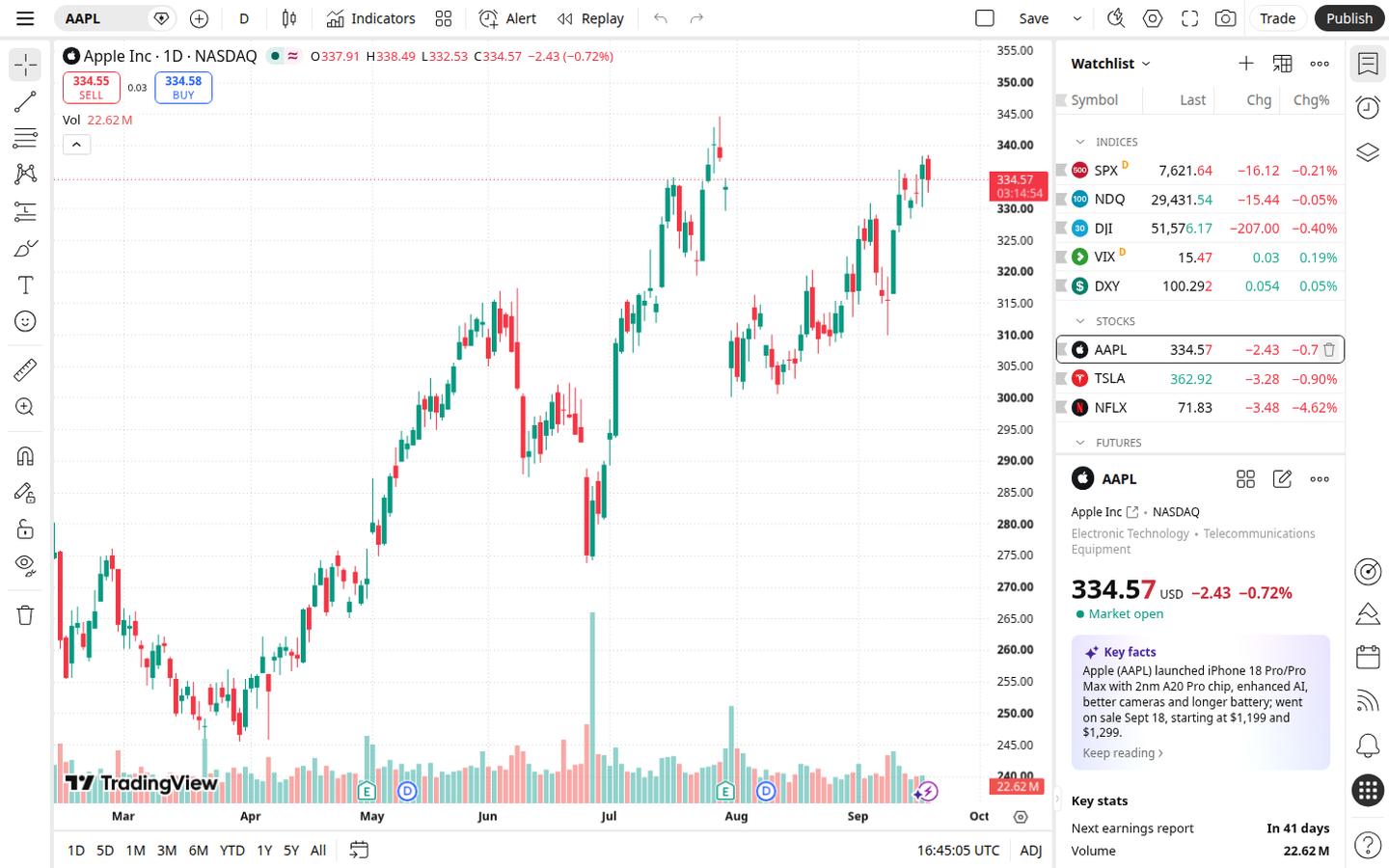
Official Supercharts product UI: AAPL workspace with watchlist (captured 2026-09-18).
Sourced from the official pages listed under Verified features. We do not invent partner-program payout rules.
Pros
- Pine Script plus a large community library, 100K+ community-powered indicators on the pricing page; Pine Script docs separately say the community has published more than 150,000 Community Scripts.
- A usable free starting point: Supercharts, a screener, three price alerts, and “No credit card needed” on the Basic card.
- Web, desktop, and mobile apps. Paid-plan cards list “No ads.”
- Canadian-listed coverage is named on official pages (Canada markets page; TSX / TSXV / NEO / CSE in widget docs).
- Optional broker routing is documented. Official pages we reviewed name Questrade and Interactive Brokers.
Cons
- Paid plans do not include live exchange data. Official help states that most stock and futures exchanges charge extra for real-time data; extra feeds are sold separately. Default U.S. stock data is from Cboe Exchange and is “slightly different from that of the primary exchanges.”
- Extra real-time data purchased on TradingView is stated not to apply to TradingView widgets.
- Only the Ultimate plan is listed as available for professional users.
- Monthly-billing sticker prices are higher than the annual specials stored in price list (Essential $14.95 / Plus $34.95 / Premium $69.95 / Ultimate $239.95 monthly vs $12.95 / $29.95 / $59.95 / $199.95 billed annually).
- Web checkout methods listed: major credit cards, PayPal, Apple Pay, crypto (including Binance Pay via Triple-A). Mobile apps also use App Store / Google Play methods. That is a payment-method split already on the pricing page, not a claim about affiliate cookies.
How it compares
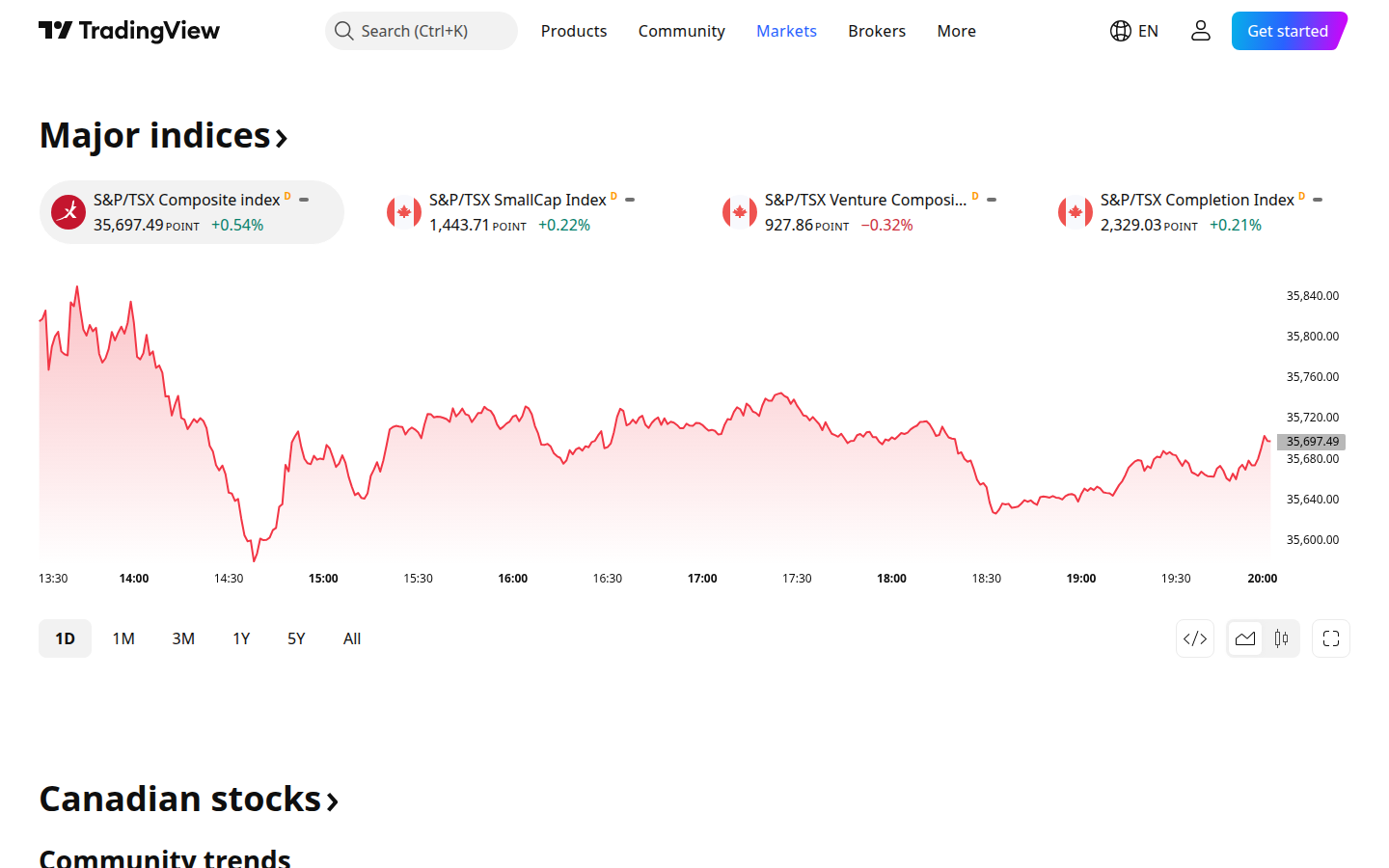
Official Canada markets page: TSX-family indices framing (not a competitor shot; captured 2026-09-13).
Neighbors on this directory for charting / screening (and adjacent jobs) include OptionStrat, Thinkorswim, tastytrade, and TrendSpider. This is not a ranking. These are neighboring listings. We do not invent star ratings. We do not claim TradingView is better.
| TradingView | OptionStrat | Thinkorswim | tastytrade | TrendSpider | |
|---|---|---|---|---|---|
| Status on this directory | Live review | Live review | Live review | Live review | Live review |
| Job | Chart and screen stocks | Visualize an options payoff (charting extras) | Chart and screen stocks (also broker jobs) | Brokerage / commissions trading (platform charting included) | Chart and screen stocks |
| What official pages describe | Supercharts, screeners, Pine Script, optional broker routing / paper trading | Interactive builder, 50+ templates, optimizer, OPRA data, unusual-flow feed | Charles Schwab brokerage platforms with built-in charting, options, paperMoney | Broker with published commissions; platform access described without a SaaS subscription | Automated technical analysis, scanners, Strategy Tester, alerts / bots |
| Price captured here | Free Basic + annual specials Essential $12.95 / Plus $29.95 / Premium $59.95 / Ultimate $199.95 (billed annually; monthly stickers higher, see Watch-outs) | Free (15-min delay) / Live Tools $39.99 a month / Live Flow $99.99 a month; annual dollars unverified | Platform no charge for Schwab clients; trades use Schwab pricing; 30-day Guest Pass | Standing commissions (e.g. stock/ETF $0; options $1 open / $0 close), see tastytrade review | Standard / Premium / Enhanced / Advanced with 14-day paid trials (see TrendSpider review) |
| Canada | Canada markets page and TSX-family widget docs; unnamed Canadian retail brokers unverified beyond Questrade / IBKR named on TV pages | Canadian-listed coverage unverified; US-listed OPRA focus | Canadian resident account / listings unverified | Official Help marks Canada NOT SUPPORTED | Canadian listings unverified; markets FAQ centers U.S. equities |
For the two-way split, see Thinkorswim vs TradingView. For a three-way trader split on this job, see TradingView vs Thinkorswim vs TrendSpider. For a Keep / Gain / Lose job-fit map of neighboring charting / screening listings (not a ranking), see TradingView alternatives. None of those rows is a recommendation to switch, and none is a claim that TradingView wins the job.
Broker on TradingView. TradingView is still analysis software. Public pages describe trading through selected brokers from Supercharts. That is third-party execution, not TradingView holding your cash, and not a broker comparison from this directory. Official pages we reviewed name Questrade and Interactive Brokers. Wealthsimple, TD Direct Investing, Qtrade, and similar Canadian retail names were not named, compatibility is unverified.
Related comparisons
-
TC2000 review (EasyScan + options) for a desktop charting / EasyScan neighbor
-
Thinkorswim vs TradingView for the dedicated two-way charting split
-
TradingView vs Thinkorswim vs TrendSpider for charting platforms side by side
-
Compare the TradingView, tastytrade, and IBKR AI connectors if you want to use TradingView with Claude or ChatGPT
-
Compare tastytrade and Interactive Brokers if you still need a US options broker
-
Compare Questrade and Wealthsimple if you trade from Canada
-
TradingView alternatives for other charting and screening tools
Verified features
Sourced from tradingview.com, tradingview.com/pricing, tradingview.com/features, tradingview.com/markets/canada, tradingview.com/widget-docs/markets/north-america, tradingview.com/pine-script-docs/welcome, the Questrade integration blog post (28 May 2024), the TradingView MCP server public beta post (16 Sep 2026) and MCP docs, and these help articles: Finding your perfect broker, How to purchase additional market data, How can I get real-time data from exchanges that I have already purchased with my broker?, and The difference between professional and non-professional status. Re-verified 2026-09-18 (MCP facts checked against official blog + docs 2026-09-28). We do not list features we could not confirm on those pages. Boolean plan checkmarks in the pricing comparison table often did not survive our HTML capture; where a cell was blank we do not invent a yes or a no.
Supercharts (publicly described)
Numeric limits from the pricing comparison table (Basic / Essential / Plus / Premium / Ultimate):
| Limit | Basic | Essential | Plus | Premium | Ultimate |
|---|---|---|---|---|---|
| Charts per tab | 1 | 2 | 4 | 8 | 16 |
| Indicators per chart | 2 | 5 | 10 | 25 | 50 |
| Indicator on indicator | 1 | 1 | 9 | 24 | 49 |
| Historical bars | 5K | 10K | 10K | 20K | 40K |
| Simultaneous chart connections | 2 | 10 | 20 | 50 | 200 |
| Customizable chart types | 17 | 17 | 17 | 21 | 21 |
| Financials per chart | 1 | 4 | 7 | 10 | 25 |
| Historical annual financials on charts | 7 years | 20 years | 20 years | 20 years | 20 years |
| Historical quarterly financials on charts | 8 years | 8 years | 8 years | 8 years | 8 years |
| Minute history | None | 180 days | 365 days | All | All |
| Second history | None | None | None | All | All |
| Tick history | None | None | None | None | 7 days |
| Calculation time limit | 20s | 40s | 40s | 40s | 100s |
Also listed on the pricing and features pages:
- 400+ built-in indicators and strategies
- 100K+ community-powered indicators on the pricing page; Pine Script docs separately say the community has published more than 150,000 Community Scripts
- 110+ smart drawing tools
- Volume profile indicators, candlestick pattern recognition, multi-timeframe analysis, and auto chart patterns (features page)
- Bar Replay, with history depth that varies by plan (see minute / second / tick rows above)
- Web, desktop, and mobile apps; the comparison table also lists native multi-monitor support and tab linking on desktop, plus native push alerts and Android / iOS widgets
- Paid-plan cards list “No ads”
Saved chart-layout counts in the captured table were 1 / 5 / 10 for Basic / Essential / Plus; Premium and Ultimate cells were blank, so those counts are unverified.
Screeners and lists (publicly described)
- Stock, ETF, DEX, and crypto screeners
- “150+ exchanges from 50+ countries” and “500+ fundamental and technical fields”
- Screener auto-refresh: 1 minute on Basic; “10 sec / 1 min” on paid plans
- Screener timeframes: D / W / M on Basic; “All” on paid plans
- Watchlist symbol cap: 30 on Basic; 1,000 on paid plans
- Number of watchlists: 1 on Basic; paid-plan cells were blank, so those counts are unverified
Alerts (publicly described)
| Limit | Basic | Essential | Plus | Premium | Ultimate |
|---|---|---|---|---|---|
| Active price alerts | 3 | 20 | 100 | 400 | 1,000 |
| Active technical alerts | None | 20 | 100 | 400 | 1,000 |
| Active watchlist alerts | None | None | None | 2 | 15 |
| Alert duration (where a number was shown) | 1 mo. | 2 mo. | 2 mo. | Not shown | Not shown |
Paid-plan marketing cards list “Alerts that don’t expire” among higher-tier features. Which exact plans get non-expiring alerts was not a filled number in the captured table, so that mapping is unverified beyond the duration numbers above.
Pine Script and backtesting (publicly described)
- Pine Script is TradingView’s language for indicators and strategies that run on TradingView’s servers.
- Docs are currently labeled Pine Script v6.
- Strategy backtesting, report metrics, CSV / XLSX export, and “deep backtesting” appear as rows on the pricing comparison. Which plans include each backtesting extra is unverified where the captured cells were blank.
Trading workflow (publicly described)
- “Trade through selected brokers,” chart trading, and simulated (paper) trading are listed on the pricing comparison.
- Help: open Supercharts, click Trade, pick a broker, log in with broker credentials, then place and manage orders from the chart.
- Paper trading is described as simulated conditions with virtual funds, customizable balances / leverage / currency / commissions, multiple accounts, and margin support.
- This directory does not treat paper-trading contests, prizes, or community ideas as evidence of skill or as a recommendation.
Data (publicly described)
- Pricing page: “hundreds of data feeds” and a live instrument count (treat the count as a snapshot, not a promise).
- Help: most stock and futures exchanges charge extra for real-time data; paid TradingView plans do not cover those fees.
- Extra real-time / intraday data (examples named on the pricing FAQ: NASDAQ, NYSE, NYSE ARCA, OTC, CME) can be added separately; you need a paid plan or a trial.
- Default U.S. stock data is from Cboe Exchange and is “slightly different from that of the primary exchanges”; NASDAQ / NYSE / ARCA real-time can be added.
- Crypto exchanges on TradingView are described as providing real-time data.
- Extra real-time data purchased on TradingView is stated not to apply to TradingView widgets.
- Maximum extra market-data subscriptions allowed: Essential 2, Plus 4, Premium 6; Basic and Ultimate cells were blank, so those two caps are unverified.
Professional status (publicly described)
- Pricing page: “Only the Ultimate plan is available for professional users.”
- Help: professional vs non-professional is about how data and the tools are used. Registered persons (the article names FINRA, NFA, CSA and similar) are professional. Non-professional status requires confirming a list of personal-use conditions (individual, personal funds, not advising others, and the rest of that article).
- A separate tax-help article still names “Expert and Ultimate” as professional plans. Expert was not a plan name on the pricing page. Whether Expert is a current public tier is unverified.
TradingView MCP (AI connector): what it does for options traders
TradingView’s official MCP server is a public beta (announced 16 Sep 2026) for Claude (web, desktop, mobile, Claude Code), ChatGPT, Codex, and other streamable-HTTP MCP clients, OAuth with your TradingView account, no API keys. Server: https://mcp.tradingview.com/mcp. Docs: tradingview.com/mcp/docs. Blog: MCP public beta.
Who. Essential and above. Trials excluded; Free / Basic not listed as eligible. Canada availability is unverified.
Can. Read quotes and bars (up to 5,000), symbol search, screener (up to 1,000 rows), technical ratings, news, analyst forecasts, financials, filings, transcripts, calendars, economic data, watchlists, alerts and alert history. Write: create, rename, delete, and edit watchlists; create price-only alerts; edit, delete, pause, or restart them. Webhooks need a webhook-capable plan plus 2FA. ~100 calls/min per user; daily beta limits may apply. Data is delayed; exact delay is unverified.
Cannot. No chart control or drawing, layouts, orders, broker connections, or positions. No options chain, Greeks, or IV. The viral “control your charts” claim is an unofficial community desktop tool, not TradingView’s server. Deleting an alert deletes its history. Cursor sign-in was reported broken (cursor:// redirect rejected).
Setup. Point a supported MCP client at https://mcp.tradingview.com/mcp and OAuth with TradingView.
Bottom line for options traders. Handy for quotes, screeners, news, and watchlist/alert chores: not an options chain, Greeks, or order tool. For official MCP option chains and Greeks, see tastytrade; Interactive Brokers’s official MCP can read option chains and draft trades you approve. Side-by-side (not a ranking): TradingView vs tastytrade vs IBKR AI connectors (MCP). If you are choosing between those two as your broker, compare tastytrade and Interactive Brokers on commissions and Canada access.
Canada note
This directory is written with readers in Canada as well as the United States.
Canadian listings. TradingView operates a public Canada markets page that lists Canadian stocks, TSX-family indices (examples on that page: S&P/TSX Composite, S&P/TSX 60, S&P/TSX Venture Composite), ETFs of Canada, and Canadian economic series. Official widget market-data docs list TSX (delayed stocks and indices), TSXV (delayed stocks and indices), NEO (delayed stocks), and CSE (end-of-day stocks and indices). So Canadian-listed coverage is not “US-only” on those official pages.
What we did not capture as a filled Supercharts data-coverage row: the exact delay length on Supercharts for TSX / TSXV, or the current real-time package dollar fees for those exchanges. Those figures are unverified. Official help still says real-time stock data is generally an extra purchase (or a broker-verified entitlement), not something a paid TradingView plan includes by default.
Montréal Exchange options and other Canadian derivatives coverage beyond what those pages name is unverified.
Canadian broker connections: named on official pages
- Questrade. A 28 May 2024 TradingView blog post, titled for Canadian traders, says Questrade users can access accounts, execute trades, and analyze markets from TradingView via the trading panel. A current help table lists Questrade for broker-verified real-time data on TSX, TSXV, NASDAQ, NYSE, AMEX (NYSE Arca), OTC, OPRA, and CBOE Futures (verification expires in 7 days, prolonged on the next Trading Panel login). Our Questrade review covers its options fees and account types.
- Interactive Brokers. Official blog and help name Interactive Brokers as an integrated broker. The same help table lists IBKR (with CapTrader, Mexem, Interactive IL) for verified real-time data that includes TSX, among many other venues. The page does not say “Interactive Brokers Canada” as a separate brand; we do not invent that label.
Not named on the official pages we reviewed: Wealthsimple, TD Direct Investing, Qtrade, and similar Canadian retail names. Compatibility with those brokers is unverified. Do not infer it. Named Canadian-broker integrations beyond Questrade / IBKR as listed above are unverified.
If you are still picking a Canadian broker, our Questrade and Wealthsimple comparison puts the two side by side. Of those two, only Questrade is named for TradingView broker connections on the pages above.
Currency (CAD vs USD), registered-account constraints (TFSA, RRSP), and Canadian tax treatment of trades are outside this review.
Confirm pricing, data rights, symbol coverage, and broker availability on the official site. We may earn a commission if you buy through links on this page: tradingview.com.
Sources
Prefer these official URLs (re-verified 2026-09-18; section shots for pricing / Supercharts / screener refreshed the same day; help + Canada-markets framing shots retained from 2026-09-13):
- tradingview.com/pricing: Basic $0 forever; Essential / Plus / Premium / Ultimate annual specials (and separately labeled monthly stickers); plan caps; cancel / refund FAQ
- tradingview.com/chart: Supercharts product UI
- tradingview.com/screener: Stock Screener product UI
- tradingview.com/support/solutions/43000471705: paid plans do not cover exchange real-time data fees
- tradingview.com/markets/canada: Canadian stocks / TSX-family indices framing
- tradingview.com/desktop: desktop Supercharts product framing
- tradingview.com/features / pine-script-docs: feature and Pine docs
- Questrade on TradingView blog / Finding your perfect broker: named broker connections
- TradingView MCP server public beta / MCP docs: official AI connector (public beta; Essential+; no options chain / Greeks / orders)
Confirm pricing on the official site before you pay. Our TradingView links are affiliate links: tradingview.com.
Disclosure
This page is a directory review of publicly priced analysis software, not financial advice, not a recommendation to buy a seat, and not a claim that any chart, alert, script, or plan will be profitable. TradingView is not listed here as a broker. We may earn a commission if you buy through links on this page. Our TradingView links are affiliate links. Prices and features change, confirm on tradingview.com/pricing before you pay.
FAQ
- Is TradingView free?
- Yes. Basic is $0 forever with “No credit card needed” on the pricing card we captured (2026-09-18). That seat is enough to open a Superchart and run a screener: 1 chart per tab, 2 indicators, 5K historical bars, and 3 price alerts. It is not a paid Essential–Ultimate seat. Paid plans come with a free trial: 30 days on Essential, Plus and Premium, and 14 days on Ultimate (pricing page re-checked 2026-09-30). Pay when you need more alerts, more indicators on one chart, more charts per tab, longer Bar Replay history, higher Pine calculation-time limits, or the paid-plan “No ads” line. For a map of neighboring charting and screening tools (including broker platforms and automation-first SaaS), see TradingView alternatives.
- What does TradingView cost?
- TradingView Supercharts pricing (tradingview.com/pricing, capture 2026-09-18 under Annually / “Special price”, same dollars on re-check 2026-09-30): Basic $0 forever; Essential $12.95 a month; Plus $29.95 a month; Premium $59.95 a month; Ultimate $199.95 a month, all paid seats billed annually. Separately labeled Monthly stickers on the same page were Essential $14.95 / Plus $34.95 / Premium $69.95 / Ultimate $239.95, do not mix those into the annual fields. Prefer Basic when free charts + screener caps are enough. Prefer Essential when you need the first paid alert / indicator / charts-per-tab lift. Prefer Plus / Premium when alert and history caps matter more. Prefer Ultimate when you need the top caps or the only plan listed for professional users. Paid plans do not cover exchange real-time data fees, extra feeds are sold separately. Confirm on TradingView’s pricing page before you pay.
- Is TradingView worth it?
- TradingView is worth it for the job when you want browser / desktop / mobile Supercharts with a screener, Pine Script, and a free Basic on-ramp, then paid Essential–Ultimate annual specials ($12.95 / $29.95 / $59.95 / $199.95 per month billed annually as captured 2026-09-18) when caps, ads, or server-side Pine limits become the bottleneck. Skip if you want TradingView to be the broker, assume paid plans include live exchange data (they do not), need Ultimate-only professional seats on a cheap Essential/Plus/Premium plan, or your primary job is options payoff diagrams / unusual-flow scanning. This directory review is a fit map, not a ranking, we do not invent star ratings and we are not saying TradingView is the best charting tool. For similar tools, see TradingView alternatives. For a three-way trader split, see TradingView vs Thinkorswim vs TrendSpider. For payoff diagrams, see OptionStrat. For unusual options flow, see Unusual Whales and Cheddar Flow.
- Is the free plan enough?
- Yes for opening a chart and running a screener. Basic is $0, with 1 chart per tab, 2 indicators, 5K historical bars, and 3 price alerts. Pay when you need more alerts, more indicators on one chart, more charts per tab, longer minute or second history for Bar Replay, or the higher Pine calculation-time limits. Paid-plan cards list “No ads”; Basic does not list that line.
- How is TradingView different from Thinkorswim / TrendSpider?
- Three neighboring products on the chart-and-screen-stocks job: not a ranking. TradingView is standalone Supercharts / screener SaaS with Basic $0 forever and paid Essential-Ultimate annual specials ($12.95 / $29.95 / $59.95 / $199.95 per month billed annually; capture 2026-09-18), plus Pine Script and optional broker routing. Thinkorswim is Charles Schwab’s brokerage platform suite (desktop / web / mobile) with platform access no charge for Schwab clients and a 30-day Guest Pass into paperMoney: not a standalone charting SaaS seat; full live trading needs a Schwab account. TrendSpider is paid automation-first charting SaaS (Standard / Premium / Enhanced / Advanced) with a 14-day paid trial (trial fees $19 / $29 / $39 / $49 on cards we list) and no ongoing free forever full-platform seat on those cards; standing post-trial dollars are confirm-on-site. Prefer TradingView when you want a free forever Supercharts on-ramp or Pine / community indicators without opening a broker account. Prefer Thinkorswim when charting should sit inside a Schwab brokerage relationship. Prefer TrendSpider when automated analysis / scanners / Strategy Tester capacity is the job. For the dedicated three-way split, see TradingView vs Thinkorswim vs TrendSpider. For similar tools (including Finviz, tastytrade, Bookmap), see TradingView alternatives. This page does not rank them. The compare pages are TradingView vs Thinkorswim vs TrendSpider and Thinkorswim vs TradingView.
- Does it work in Canada?
- Yes as charting and screening software with Canadian-listed coverage that official pages already name. TradingView’s Canada markets page lists Canadian stocks, TSX-family indices (examples on that page: S&P/TSX Composite, S&P/TSX 60, S&P/TSX Venture Composite), ETFs of Canada, and Canadian economic series. Official widget market-data docs list TSX (delayed stocks and indices), TSXV (delayed stocks and indices), NEO (delayed stocks), and CSE (end-of-day stocks and indices). Exact Supercharts delay length and real-time package dollar fees for those exchanges are unverified. Questrade and Interactive Brokers are named for broker connections. Wealthsimple, TD Direct Investing, and Qtrade are unverified. Do not infer them.
- Do I need a broker on TradingView?
- No. TradingView is not a broker, and charting, screening, watchlists, alerts, and Pine Script do not require a connected broker. Connecting a broker is optional if you want to send orders from the chart. Paper trading is listed as simulated practice with virtual funds.
- Does TradingView have an MCP / AI connector?
- Yes. TradingView’s official MCP server is in public beta (announced 16 Sep 2026) for Essential and above (trial plans excluded; Free / Basic is not listed as eligible). It connects Claude, ChatGPT, Codex, and other streamable-HTTP MCP clients over OAuth at https://mcp.tradingview.com/mcp, no API keys. It can read quotes, bars, screeners, news, financials, watchlists, and alerts, and write watchlists plus price-only alerts. It cannot control charts, place orders, or read options chains / Greeks / IV. Canada availability is unverified. See the TradingView MCP section on this page.
- Can the TradingView MCP read options chains or place trades?
- No. TradingView’s official MCP has no options chain, Greeks, IV, orders, broker connections, or positions. Price-only alerts and watchlist edits are the write side. For official MCP option-chain / Greeks access, see tastytrade; Interactive Brokers’ official MCP can read option chains and draft trades you approve.
- Does TradingView have a free trial?
- Essential, Plus and Premium include a 30-day trial, and Ultimate includes 14 days. Basic is $0 forever.
- Which TradingView plan should I pick?
- Basic is $0 forever for charts and a screener. Essential is the first paid lift for alerts, indicators, and charts per tab. Plus and Premium fit when alert and history caps matter. Ultimate is for the top caps and is the only plan listed for professional users. This is not a ranking. Confirm on TradingView’s pricing page before you pay.